


FORA Neurons
FORA Neurons are your always-on FORA watchers at app.formion.ai → Neurons. They keep looking while you are away and tell you in the app and on  Telegram (the chat you linked under Alerts).
Active Neurons per plan: Neural (Free) 2 · Pro 25 · Institutional unlimited (a  FOM boost adds more — see FOM token). Pricing details: Pricing & Tiers.
The Neurons dashboard
Section titled “The Neurons dashboard”Open Neurons in the main menu of app.formion.ai/neurons — the green number next to it is how many Neurons you have active — or tap the Neurons icon in the FORA chat header. The dashboard answers one question: what did my Neurons do, exactly when, why, and where did it go?
Open Neurons → see every Neuron → read the timeline → test one → ask FORA why (DEMO values).
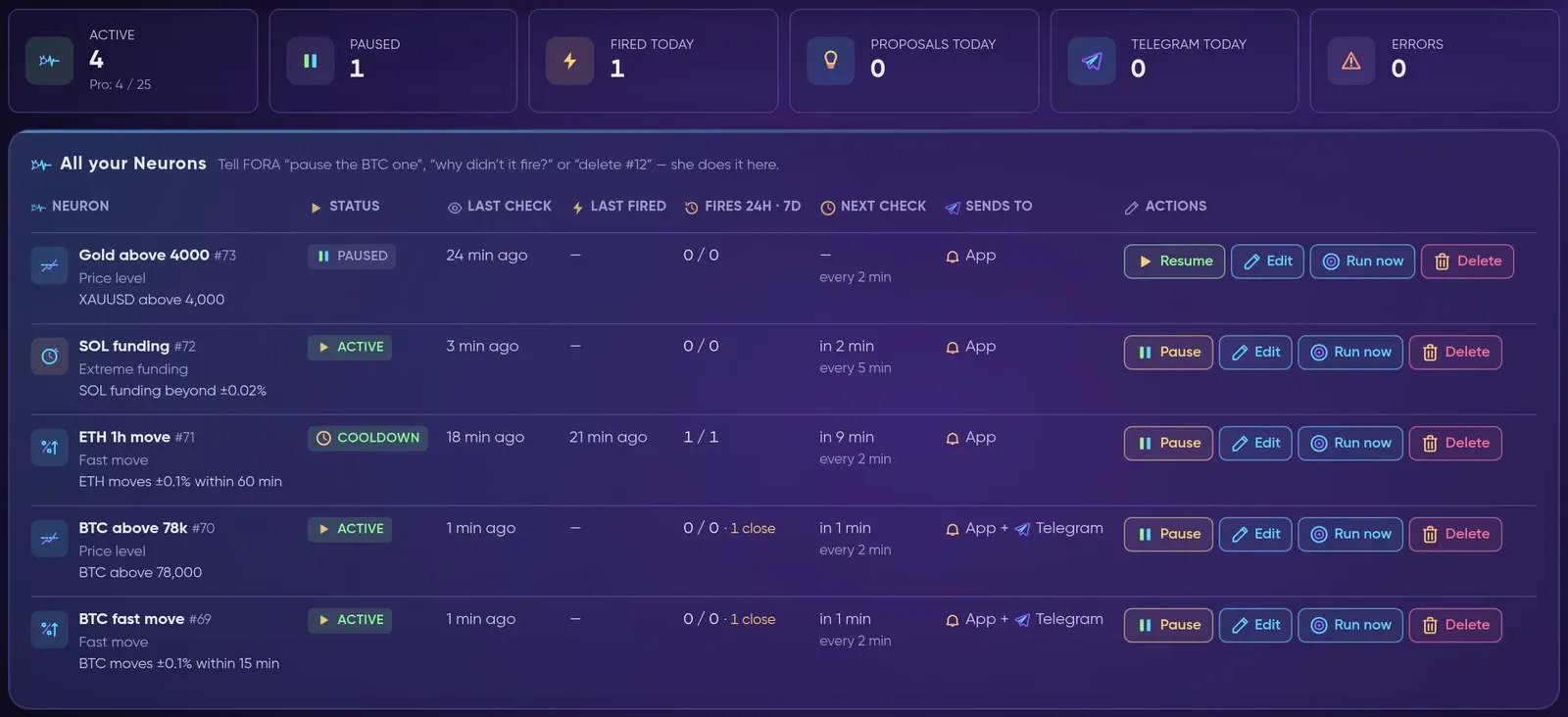
The count tiles and All your Neurons (Docs Demo account, live data).
| Tile | What it counts |
|---|---|
| Active | Neurons running now, with your plan’s limit under the number (for example Pro: 4 / 25). |
| Paused | Neurons you paused, or that are paused by your plan limit. |
| Fired today | How many times your Neurons fired today. |
| Proposals today | Trade and KOL proposals made today. |
| Telegram today |
Messages delivered to your Telegram today. |
| Errors | Neurons whose last check failed. |
All your Neurons
Section titled “All your Neurons”One row per Neuron: its type and rule, Status (active, cooldown, paused, paused · plan limit, done or error), Last check, Last fired, Fires 24h · 7d (plus how many times it came close in the last 24 hours), Next check with how often it checks, and Sends to (App, or App + Telegram). On a phone every Neuron is a card with the same facts and buttons.
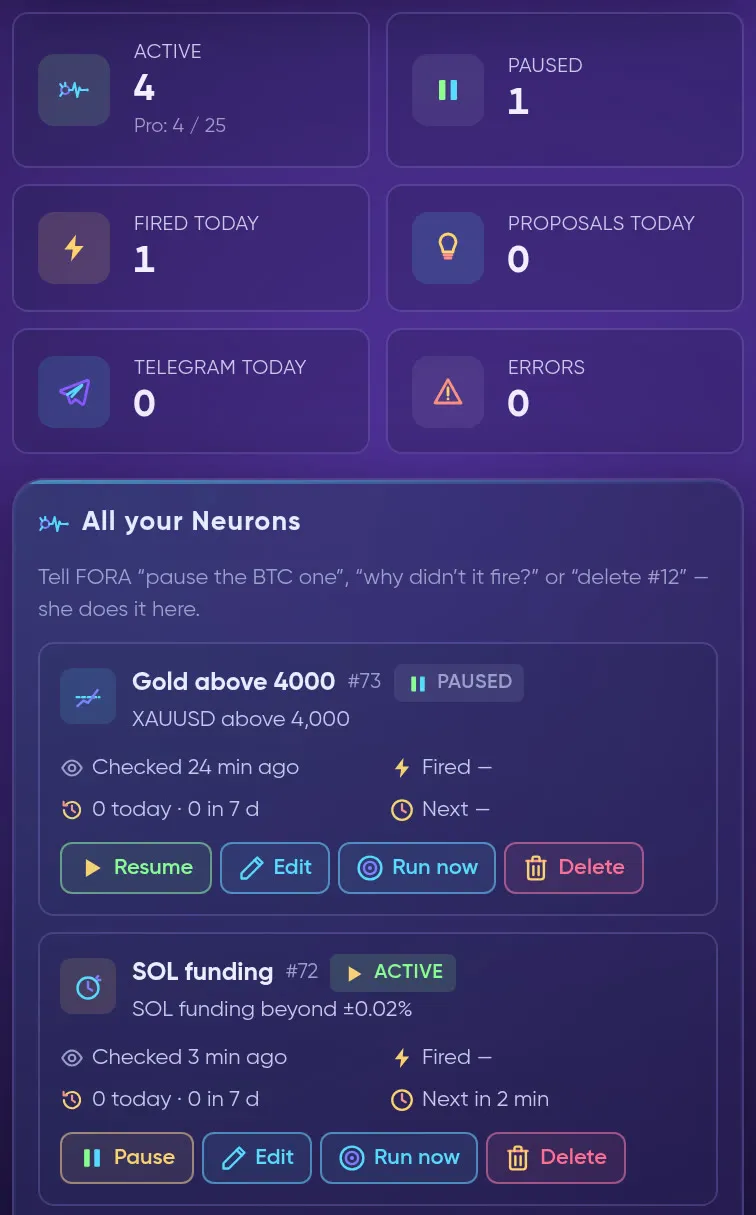
On a phone: the same tiles, one card per Neuron.
| Action | What it does |
|---|---|
| Pause / Resume | Stops or restarts the Neuron. Nothing else changes. |
| Edit | Change the name, the values of the rule, Also send to Telegram, Check every (min) and Quiet after a fire (min). Your plan sets the fastest check; a faster value is raised to it automatically. |
| Run now | Tests the Neuron with live data: It would fire now or It would not fire now, with the exact values, source and data time. It is a dry run — nothing is sent and the Neuron does not change. |
| Delete | Asks first, then removes the Neuron and its history. This cannot be undone, so pause it if you may need it later. |
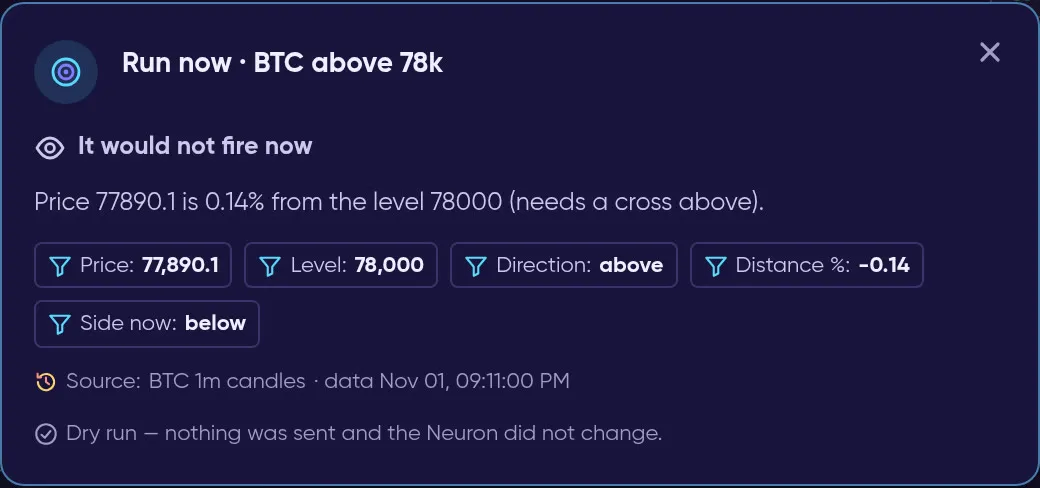
Run now checks the rule on live data and sends nothing.
A real check also passes FORA’s gate and the cooldown, so It would fire now does not always mean a message is on its way. Neurons that run research or a schedule cannot be dry-run; for those the window shows the next real check instead.
Activity timeline — when, why, where
Section titled “Activity timeline — when, why, where”Under the table, the Activity timeline lists everything that mattered, newest first:
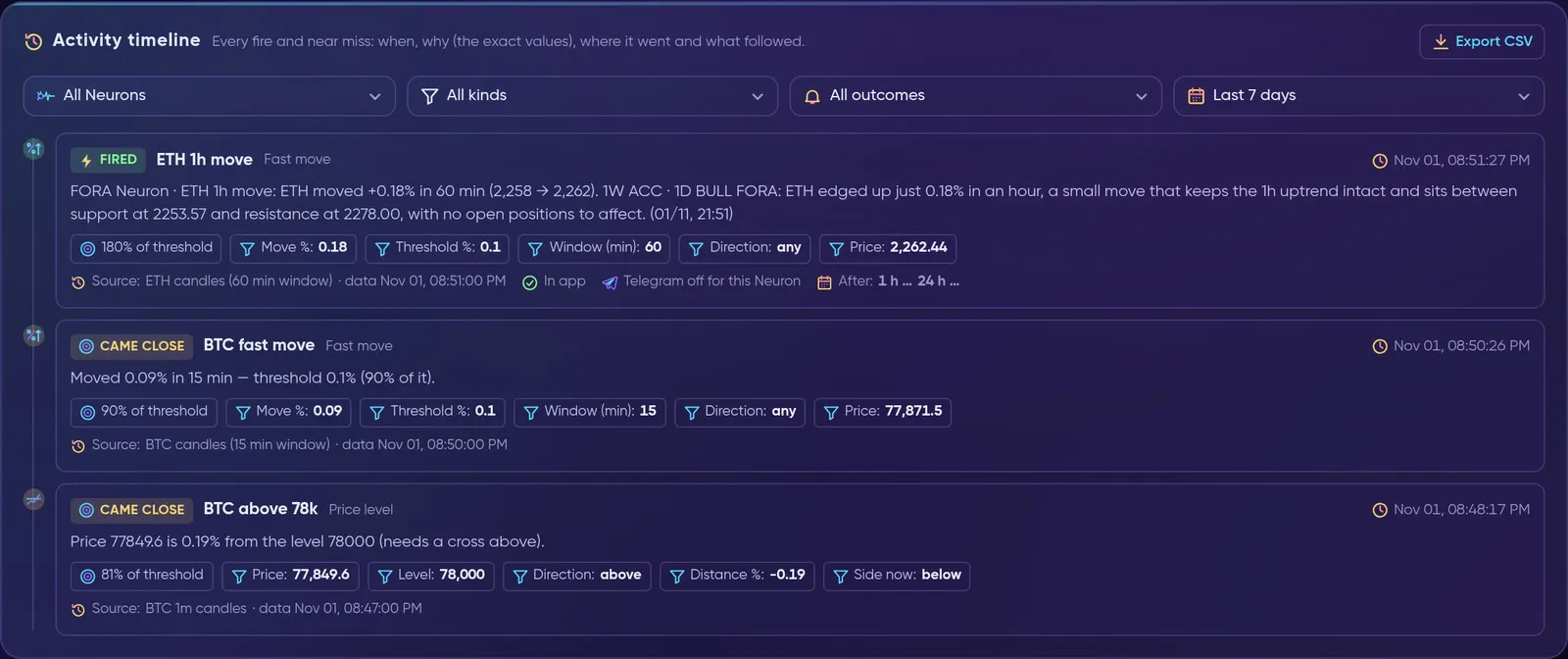
Each entry shows when, why (the exact values) and where it went (Docs Demo account, live data).
| Outcome | What it means |
|---|---|
| Fired | The rule matched and the message went out. |
| Came close | It nearly fired: at least 70 % of the threshold, or price within 0.5 % of your level. Logged at most once per Neuron every 30 minutes, unless it got clearly closer. |
| Held by FORA | The rule matched, but FORA’s gate held it back. The reason is in the entry. |
| Not delivered | The rule matched, but neither the app nor Telegram took the message. |
| Check failed | The check itself failed, for example a data source was down. |
| Proposed / Watching / Skipped | What FORA decided on a KOL watch call. |
| Plan step | A “do this now” message from a plan you follow in My plan. |
Every entry answers three questions:
- When — the time of the decision, to the second.
- Why — the exact values behind it, such as Move %: 0.12 against Threshold %: 0.1, or Price, Level and Distance %, with the source and the time of the data it used.
- Where — In app, and the Telegram status: Telegram delivered, Telegram not linked, Telegram notifications off, Telegram off for this Neuron, already sent, held: quiet hours or held: daily Telegram limit.
When the entry is about a coin, After shows what its price did 1 hour and 24 hours later. That is context about the market, not a result and not a promise.
Filter by Neuron, kind, outcome and period (last 24 hours, 7 days or 30 days), use Show more for older entries and Export CSV to download what you filtered. Entries are kept for 30 days. Near misses are logged from November 1, 2026; older fires come from the existing history.
The real dashboard: tiles, Run now, the timeline and its filter (Docs Demo account).
Manage Neurons by talking to FORA
Section titled “Manage Neurons by talking to FORA”Everything above also works in FORA chat and by voice — she uses the same data and the same rules. Say it in your own words and name the Neuron, or use its number:
| You say | FORA does |
|---|---|
| “Show me my neurons” | The dashboard counts and every Neuron with its last and next check. |
“Tell me when  BTC goes above 100k” |
Creates a Neuron, within your plan’s limits. |
“Pause my  gold alert” |
Pauses it. |
“Turn  ETH funding back on” |
Resumes it. |
| “Change the level to 95k for BTC 100k” |
Updates only that value. |
| “Why did my funding neuron fire?” | The exact values, the source and where the message went, read from the record. |
“Why didn’t it tell me about  SOL?” |
The last checks and values, any cooldown or error, and how close it came. |
| “What did my neurons do today?” | The activity of all your Neurons. |
| “Test the BTC 100k neuron now” |
A dry run with live data. Nothing is sent. |
| “Delete the BTC 100k neuron” |
Deletes it, because you said delete and named it in the same message. |
- If a name fits more than one Neuron, FORA asks which one you mean.
- “Delete it”, without saying which, only shows a card — it is deleted when you confirm.
- After every change FORA gives you a link that opens that Neuron’s row on the dashboard.
- Your plan’s limits and the checks on values are the same as in the app. A threshold that is out of range, such as a fast move under 0.1 %, is refused and FORA tells you why.
Neuron types
Section titled “Neuron types”| Neuron | What it watches |
|---|---|
| Price level | Tells you when price crosses a level. |
| Fast move | A % move within N minutes. |
| Extreme funding | Perp funding beyond a threshold. |
| Open interest | OI changes by % over a window. |
| Volatility spike | Range jumps vs its usual size. |
| News watch | Headlines with your words or coins. |
| Social watch | New posts from X, Telegram and YouTube accounts you pick. |
| Several conditions | Price, move, funding, open interest and news together (all or any). |
| Macro playbook | Before and after CPI, PPI, FOMC, NFP: how gold and BTC reacted since 2020, and the plan. |
| Trader coach (Pro+) | Reads your own trades, finds where you lose, tests strategies on 6 months. |
| Price action | Market structure on closed bars: CHoCH / BOS, swings, previous-day sweeps, order blocks, FVG, daily EMA 200, divergences, candle patterns. |
| Daily brief | Prices and mood at your time. |
| Research watch (Pro+) | Deep research on a topic; tells you only when it changes. |
| Position guard | Stop, liquidation and funding watch on your open positions. |
| My strategy signal | Your saved strategy runs live on its own data and tells you on a new signal. Never trades. |
| Liquidity alerts | Strong liquidation zones near price, order-book holes and third-party setups — each with our own measured record. |
| Liquidation level | Price near a strong level of our liquidation model, then a confirmed break or a rejection, with the context. Context, not a signal. |
| KOL watch (Pro+) | Follows the KOLs you choose (or the best measured ones) and proposes, watches or skips each new call — see below. |
| Spot scout (Pro+) | Daily or weekly: which spot coins to buy, short and long term, each source weighted by its measured record. |
My plan — the FORA planner
Section titled “My plan — the FORA planner”Under the dashboard, My plan — FORA planner answers four questions for the token calls Formion researches: when to act, what to pick, how much to put in and how to exit — from your own settings and our measured data. The same planner answers in FORA chat (“what should I buy today?”, “how much X?”, “make me a plan for $500”, “when do I sell?”), on the KOL watch card and in the Dossier Telegram message.
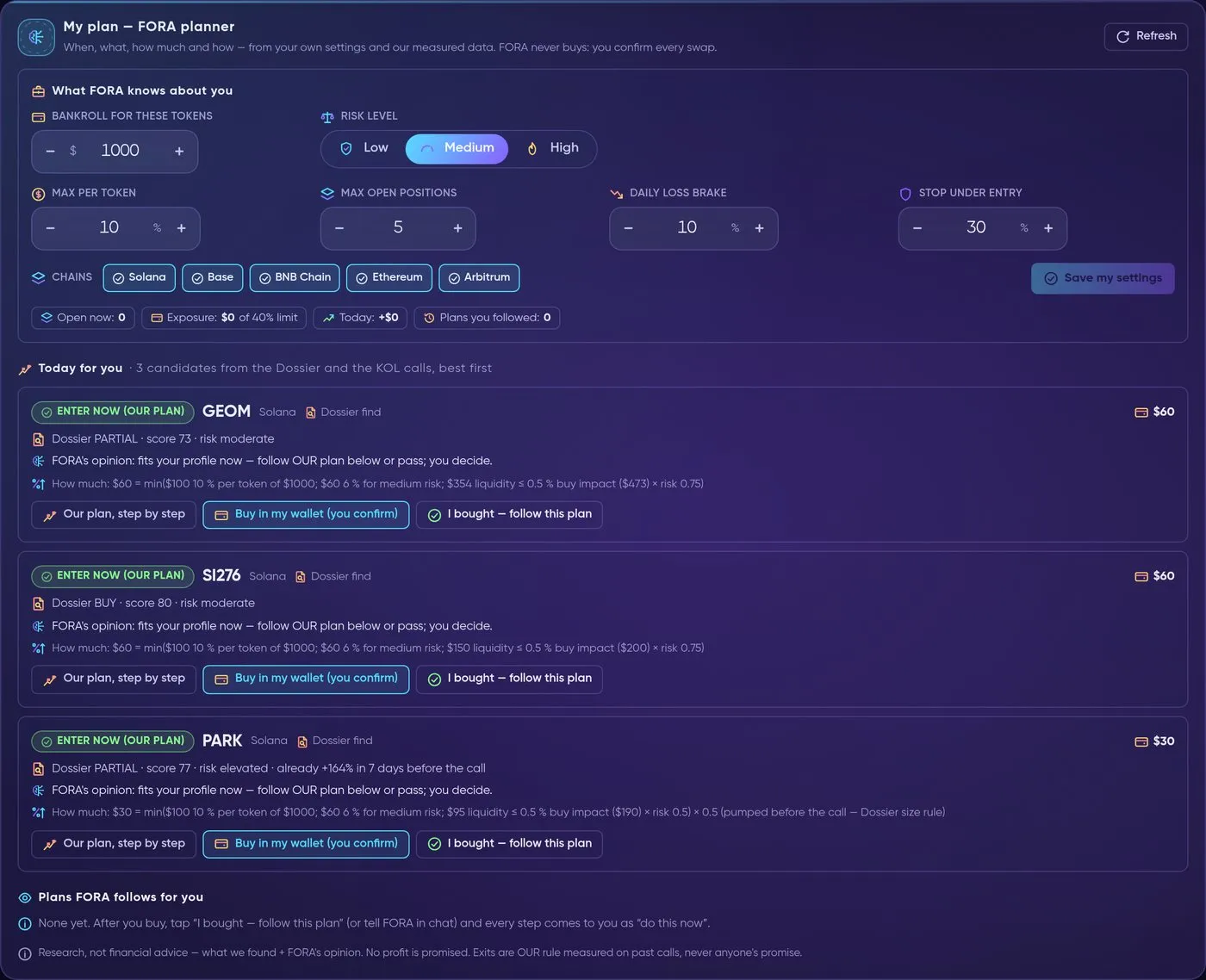
Neurons → My plan: your settings on top, today's plans ranked for you below (Docs Demo account, live data).
From your settings to "do this now": the whole planner flow in 17 seconds (sample token, DEMO values).
1. What FORA knows about you
Section titled “1. What FORA knows about you”You set it once in What FORA knows about you (or tell FORA in chat). When something is missing, FORA asks once; after that it uses the defaults and tells you which ones it used.
- Bankroll for these tokens — the money you want planned, in USD.
- Risk level — Low, Medium or High (Medium is used until you pick).
- Max per token, Max open positions, Daily loss brake and Stop under entry — your own caps.
- Chains — Solana,
 Base,
 BNB Chain,
 Ethereum,
 Arbitrum.
Each risk level starts from OUR preset (you can override every number):
| Low | Medium | High | |
|---|---|---|---|
| Size per plan | 3 % of bankroll | 6 % | 10 % |
| Max per token | 5 % | 10 % | 20 % |
| Max open positions | 3 | 5 | 8 |
| Max total exposure | 25 % | 40 % | 60 % |
| Daily loss brake | 5 % | 10 % | 20 % |
| Minimum Dossier score | 70 | 60 | 55 |
FORA also reads what you already hold through Formion — plans you follow, Dossier entries you logged and the Dossier Autopilot book — to see your exposure, today’s P&L and how your past plans did (the strip Open now · Exposure · Today · Plans you followed).
2. Today for you — what and when
Section titled “2. Today for you — what and when”Candidates are the Dossier’s quality first calls (up to 48 hours old) and KOL calls that passed the KOL watch chain (up to 24 hours old). FORA ranks them for you and fills your portfolio in order, so a small account gets fewer plans, not all of them. Each plan gets one decision:
| Decision | Meaning |
|---|---|
| ENTER NOW (our plan) | Fits your profile now — follow OUR plan or pass; you decide. |
| WAIT | Worth watching, not buying yet (for example it already ran far above the Dossier decision price). |
| NOT TODAY | It would break one of your limits: max open positions, same chain and class, or the daily loss brake. |
| SKIP | Outside your risk level or score minimum, or the stake-back or stop level was already passed. |
Every reason comes from data: how far the token moved from the Dossier price, the verdict and risk, the age of the decision, the BTC regime (on Low risk), and your portfolio.
3. How much
Section titled “3. How much”The size is the smallest of: your max per token, the % for your risk level, the pool’s liquidity (the buy may move the price at most 0.5 %, from the measured quote ladder, times a risk factor), your Dossier max per trade and your remaining exposure room — times the Dossier factor for the token’s stage (for example half size when it pumped before the call). The math is shown in one line, e.g. “$60 = min($100 10 % per token of $1000; $60 6 % for medium risk; $354 liquidity ≤ 0.5 % buy impact)”. When the result is below a sensible minimum ticket ($15, Ethereum mainnet $100), it is raised to that minimum and you get fewer positions instead of tiny ones.
4. How — OUR exit plan
Section titled “4. How — OUR exit plan”Our plan, step by step opens the steps: entry near the Dossier decision price, then OUR exit ladder measured on past calls of the same stage or class (for KOL calls the KOL plan), the stake-back step, the stop (−30 % on an hourly close, or your own stop) and a time exit after at most 7 days, plus what FORA watches.
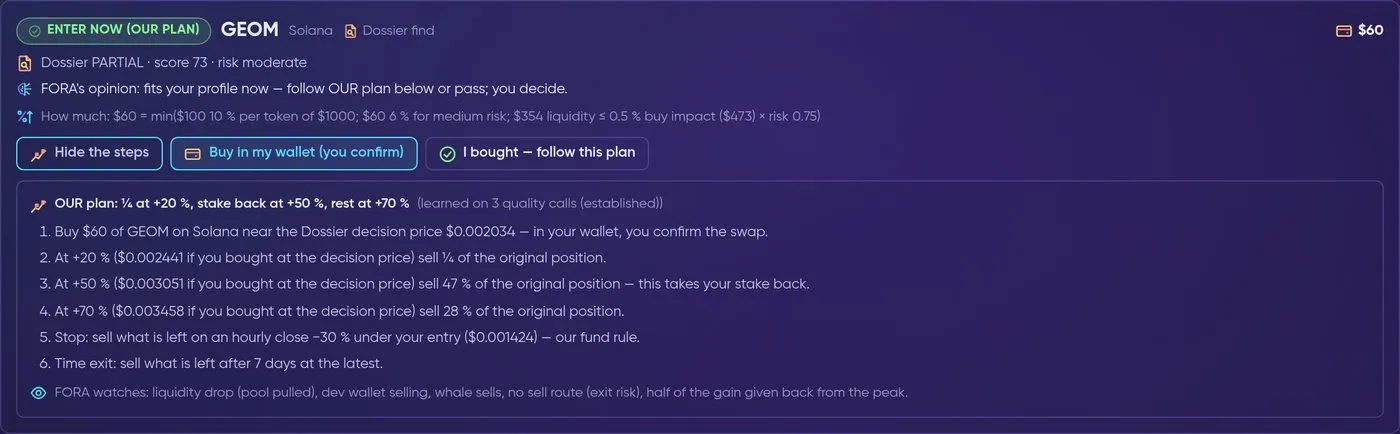
One plan opened: entry, OUR exit ladder, stop, time exit and the risk events FORA watches.
5. I bought — FORA follows the plan
Section titled “5. I bought — FORA follows the plan”Buy in my wallet (you confirm) pre-fills the swap in Formion Wallet — you review and sign. FORA never buys. After you buy, tap I bought — follow this plan (or tell FORA in chat). From then on FORA checks every 5 minutes and sends “do this now” in the app and on Telegram for:
- each step of the exit ladder and the stake-back step;
- the stop, giving back half of the gain from the peak, and the 7-day time exit;
- risk events from the live Dossier tracker: liquidity pulled from the pool, the dev wallet selling, whales selling, a worse sell route (exit risk).
Each message is sent exactly once. A plan closes by itself on the stop, the time exit or when every step is done; Yes, I sold — stop ends it any time. Every Monday you get “How your plans did this week” — plans, closed and open, and the result of OUR plan steps as a paper estimate from your entries.
Free vs Pro
Section titled “Free vs Pro”Neural (Free) sees what FORA likes today and why — the token, the reasons and FORA’s opinion — without numbers (no entry, size or exits). Pro and Institutional add the entry, the size for your bankroll, OUR exit steps and FORA following every step for you; the same unlock is available with FOM Lock. Up to 3 plans at a time on Free, 5 on Pro and 10 on Institutional.
KOL watch Neuron
Section titled “KOL watch Neuron”KOL watch (Pro and Institutional) follows KOLs on X and Telegram and lets FORA decide on every new call they post.
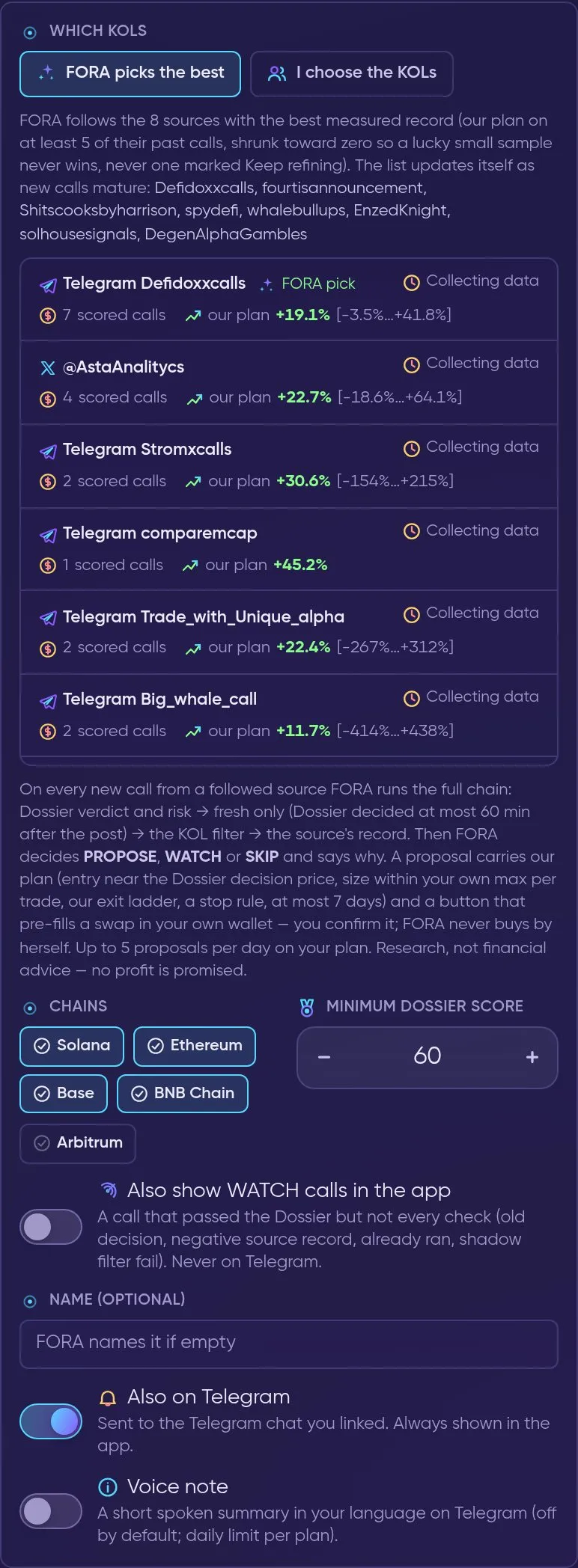
New Neuron → KOL watch: pick the sources, chains and minimum Dossier score (Docs Demo account).
- Which KOLs — FORA picks the best (the sources with the best measured record: our plan on at least 5 of their past calls, never one marked Keep refining; the list updates itself) or I choose the KOLs from the measured list. Each source shows its scored calls, our plan’s average with its range, and a status such as Verified or Collecting data.
- The chain on every new call — Dossier verdict and risk → fresh only (the Dossier decided at most 60 minutes after the post) → the KOL filter → the source’s record. Then FORA decides PROPOSE, WATCH or SKIP and says why in one sentence.
- A PROPOSE card (app + Telegram) carries what we found, FORA’s opinion and OUR plan: entry near the Dossier decision price, a size within your own max per trade, our exit ladder, the stop rule and at most 7 days — plus Buy in my wallet, which only pre-fills a swap you confirm. The card also carries your personal plan line from My plan (Your plan …).
- Limits — up to 5 proposals a day on Pro and 20 on Institutional; a FOM boost adds more.
- Also show WATCH calls in the app (optional) — calls that passed the Dossier but not every check. Never on Telegram.
Free: one token of opportunity per week
Section titled “Free: one token of opportunity per week”Free users with active Neurons can get at most one token of opportunity every 7 days — and never a new one while the previous one is still open. It is only a call that passed the whole chain as PROPOSE, with the token, chain, why and FORA’s opinion — no entry, exit or amount. The full plan is in Pro (7-day trial) or with FOM Lock.