


FOM Hold vs Lock — which one is for you
There are two ways to use  FOM for a FORA Agent level (and its included licence) or for a Dossier Autopilot package: hold it or lock it.
Both count the US-dollar value of your FOM, measured with the lower of the 7-day and 30-day TWAP of the official FOM/WETH pool on
 Base,
so a short price spike cannot inflate your level. This page explains the difference in plain words. The full rules are on the
FOM token page.
Status (29 October 2026). Lock is live in beta (Formion Wallet → Earn →
Value uses the lower of the 7-day and 30-day TWAP; longer locks weigh more; Hold needs twice the lock value; a lock has no early unlock and 7 days of unbonding.
Hold, Lock and the FOM Boost
Section titled “Hold, Lock and the FOM Boost”Besides levels, FOM gives a boost on top of every plan. For the boost, a lock counts in full and a hold counts half ($500 held = $250 locked). Steps above $250 need a lock of 90 days or more.
What is Hold?
Section titled “What is Hold?”Hold means your FOM simply stays in your own self-custody wallet, which you verify once on your Formion account with a signature.
Nothing is moved, nothing is locked: you can sell or send your FOM at any time.
- Counted value = the lowest FOM balance of the last 7 days × the lower of the 7-day and 30-day TWAP. Because the lowest balance counts,
FOM you just bought counts in full only after it has stayed in the wallet for 7 days.
- FOM on an exchange never counts. One wallet backs one account.
- Because you stay free to sell, Hold needs twice the lock value.
- If you sell or move FOM below the threshold, access ends immediately. If only the price falls (no transfer), you get a warning and
48 hours to restore the value.
What is Lock?
Section titled “What is Lock?”Lock means you put FOM into the FOM Lock v3 contract on Base for a fixed period. Formion never takes custody: the contract holds it,
and only your wallet can withdraw it after the period.
- Periods: 30, 90 or 180 days, weighted ×1.0, ×1.25 and ×1.5. Example: $800 locked for 180 days counts as $1,200.
- FORA Agent and higher need a lock of at least 90 days. A 30-day lock reaches the Holder level at most.
- The value is measured when you lock and stays fixed for the whole period. If the price rises, your level can move up at any time; if it falls, your level stays until the period ends. At renewal it is measured again; below the threshold you have 7 days to top up, otherwise the level moves one step down.
- No early unlock. When the period ends, withdrawal takes 7 days (unbonding).
- To get the included licence, link the locking wallet to your Formion account once (a signature, no spending permission). One lock backs one account.
- Contract
0xb3eBdba1188B11016B99C033055aFA7532259f69(Basescan). Internal security review completed; no external audit has been performed yet. During the beta the contract has a total lock cap.
Side by side
Section titled “Side by side”| Hold | Lock | |
|---|---|---|
| Where your FOM sits |
Your own self-custody wallet | FOM Lock v3 contract on Base (no custody by Formion) |
| Can you sell or move it? | Yes, any time | No — not until the period ends, plus 7 days unbonding |
| How value is counted | Lowest balance of the last 7 days × lower of 7d / 30d TWAP | Amount × lower of 7d / 30d TWAP at lock time × period weight (×1.0 / ×1.25 / ×1.5), fixed for the period |
| How much you need | 2× the lock value | Half of Hold — the cheaper way for the long term |
| When access starts | When the verified balance reaches the threshold (new FOM counts in full after 7 days) |
After the lock is confirmed and the wallet is linked |
| When access stops | At once if you sell/move below the threshold; 48 h grace if only the price falls | When the lock period ends (no early unlock) |
| Price drop | Can switch the level off after 48 h | Level kept until the period ends; re-measured at renewal (7 days to top up) |
| Levels (Formion Wallet: ÷2) | Holder $500 · FORA Agent $2,000 · Agent Pro $10,000 · FORA AGI $50,000 | Holder $250 · FORA Agent $1,000 · Agent Pro $5,000 · FORA AGI $25,000 (FORA Agent+ need 90+ days) |
| Included licence | FORA Agent → Pro · Agent Pro and FORA AGI → Institutional | Same |
| Dossier Autopilot (Formion Wallet: ÷2) | Starter $500 · Pro $2,000 · Unlimited $10,000 | Starter $250 · Pro $1,000 · Unlimited $5,000 |
| Extra risk | None beyond your own wallet | Smart-contract risk (beta, no external audit yet); you cannot sell while locked |
| Status | Rolling out for licences | Live in beta |
Dossier Autopilot can also be paid monthly in FOM instead ($19 / $49 / $149 per 30 days; 50% of every payment is burned).
With Formion Wallet as your verified wallet, every hold and lock value is halved.
Pros and cons
Section titled “Pros and cons”Hold
- Your FOM never leaves your wallet; you can sell or move it any time.
- No smart-contract risk beyond your own wallet.
- Needs twice the value of a lock.
- A price drop can switch your level off after 48 hours; a sale or transfer below the threshold switches it off at once.
- New FOM counts in full only after 7 days in the wallet.
Lock
- Needs only half the value; 90 and 180 days weigh more (×1.25 / ×1.5).
- The value is fixed for the period, so a price drop does not cost you the level before renewal.
- You cannot sell or move locked FOM before the period ends, and withdrawal then takes 7 days — even if the price falls in the meantime.
- No early unlock.
- Beta contract: internal security review only, no external audit yet.
Which one is for me?
Section titled “Which one is for me?”- “I want to stay free to sell at any time.” → Hold. You need twice the value, but nothing is locked.
- “I plan to keep FOM for months and want the lowest amount.” → Lock for 90 or 180 days. It needs half the value and the level survives price drops until renewal.
- “I only want to try the perks.” → Lock for 30 days reaches the Holder level ($250 counted value). For an included licence you need 90+ days.
- “I need FOM for Dossier Autopilot only for a short time.” → Hold, or pay monthly in FOM.
In every case, using Formion Wallet as your verified wallet halves the amount.
How to hold, lock and unlock — step by step
Section titled “How to hold, lock and unlock — step by step”You just bought FOM? These six steps take you from a wallet to a counted boost or level. The labels in bold are the exact buttons and cards you will see.
Get FOM → link the wallet with one signature → hold or lock 30 / 90 / 180 days → after the period: Start unbonding, wait 7 days, Withdraw (sample values).
- Get FOM. Buy FOM on Base in the Formion Wallet (Swap), or send it to a Base wallet you own. FOM on an exchange never counts.
- Link the wallet to your Formion account. Signing one message is free: it only proves you own the wallet, moves no funds and gives no spending permission.
One wallet belongs to one account. There are two ways:
- Formion Wallet: open Earn → FOM Lock, and in the card Licence from your lock press Link wallet to my account, check the message, then Sign and link.
This works before you lock anything, so it also links the wallet for holding.
- Any other Base wallet (
 MetaMask,
 Coinbase Wallet…): open formion.ai Profile → License, and in the FOM access card (right above Your FOM boost)
press Connect wallet & sign, then sign the message in your wallet. The same card is also on your formion.ai Dashboard, even before you connect any exchange.
- Formion Wallet: open Earn →
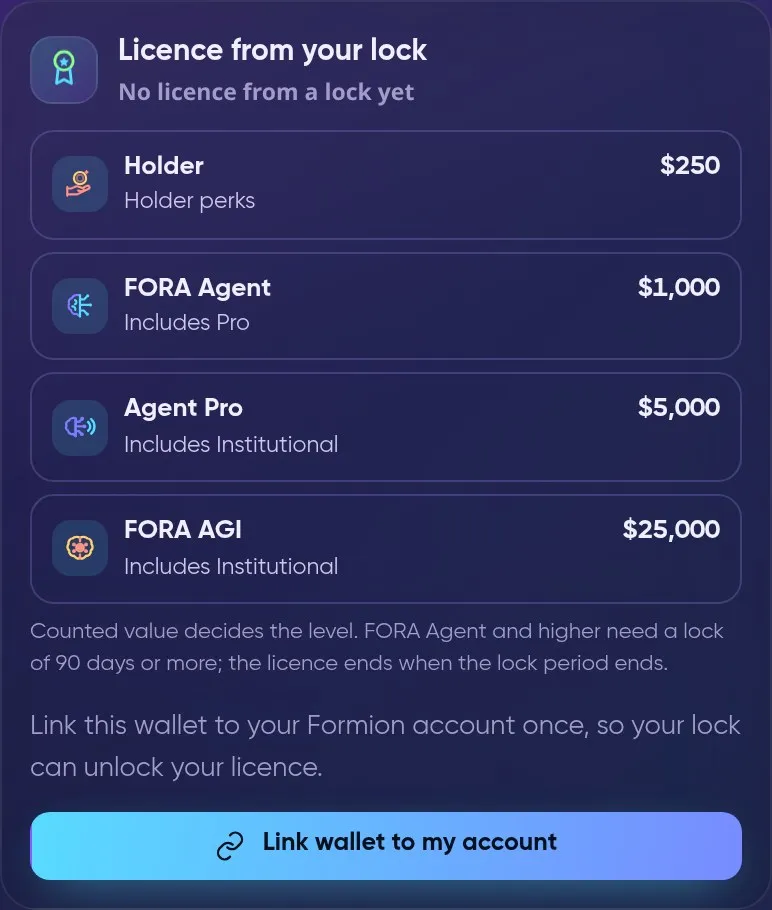
Formion Wallet → Earn → FOM Lock → Licence from your lock: link the wallet with one signature.
- Hold — nothing else to do. FOM on the linked wallet counts automatically. For the FOM Boost it counts at half its value. The lowest balance of the last 7 days
is used, so new FOM counts gradually. You can sell or move it any time — the boost (or level) then drops.
- Lock — full value, bigger boost. Open wallet.formion.ai → Earn → FOM Lock (Beta). Enter the Amount (FOM), choose the Lock period — 30, 90 or 180 days,
counted ×1, ×1.25 or ×1.5 — and check the line “This lock would count as … → level”. Press Review, allow the lock contract to take exactly that amount (step 1),
tick “I understand: the FOM cannot be withdrawn before the period ends and the 7-day unbonding is over” and press Sign and send. You need a little
 ETH on Base for the network fee.
- Licence levels and FOM Boost steps above $250 need a lock of 90 days or more.
- The FOM stays in your own lock in the contract
0xb3eBdba1188B11016B99C033055aFA7532259f69onBase; only the wallet that locked it can withdraw it. - Add FOM adds to the lock (the period starts again from today); Extend period moves it to a longer period. There is no early unlock.
- Licence levels and
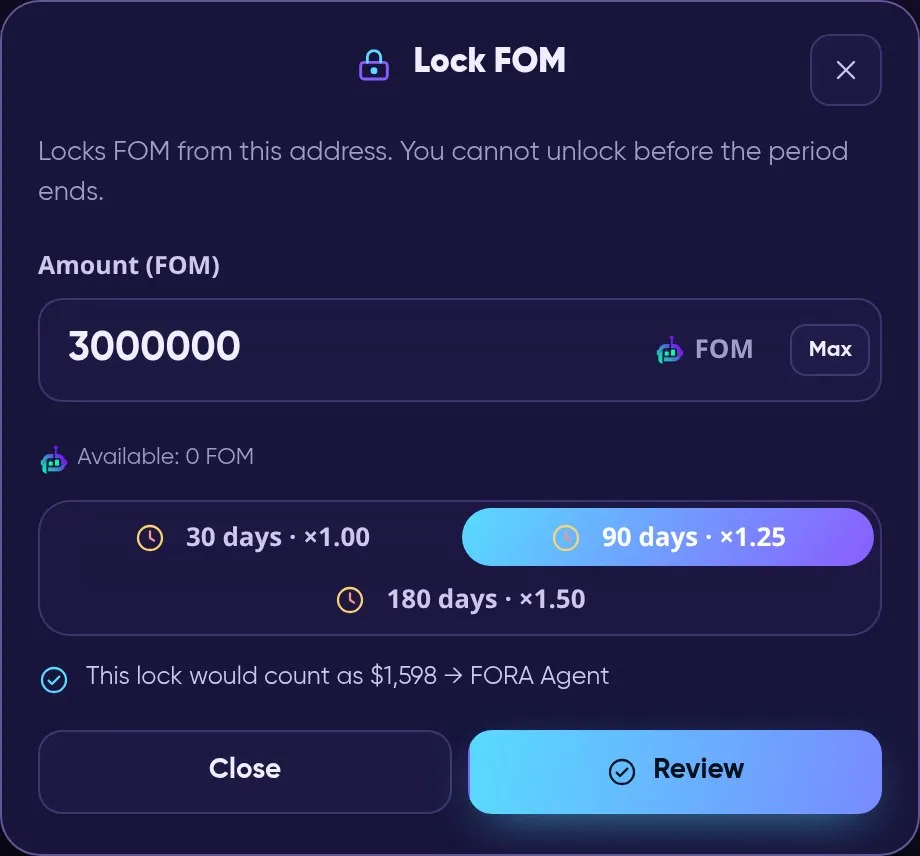
Earn → FOM Lock → Lock FOM: amount, period and what the lock would count as (sample amount).
- Unlock and withdraw. When the period ends the status shows Period ended. Press Start unbonding in Earn → FOM Lock, wait 7 days (status Unbonding),
then Ready to withdraw appears and Withdraw sends all your FOM back to your wallet. Renew instead starts a new period with the same FOM (it also cancels an unbonding in progress).
The boost and any licence from the lock end when the lock period ends.
- See your boost. The card Your FOM boost (formion.ai Profile → License, also on the Dashboard) shows your FOM value (lock + half of hold), what is locked and held, every step of your plan
(Free: $25 / $50 / $100 lock, then Holder $250 · Pro: $250 / $1,000 / $2,500 · Institutional: $1,000 / $5,000 / $25,000) and how much is missing for the next one.
During the launch period (until 13 November 2026) each step needs only the fraction shown in the card. The Formion Wallet 50% discount does not apply to boost steps.
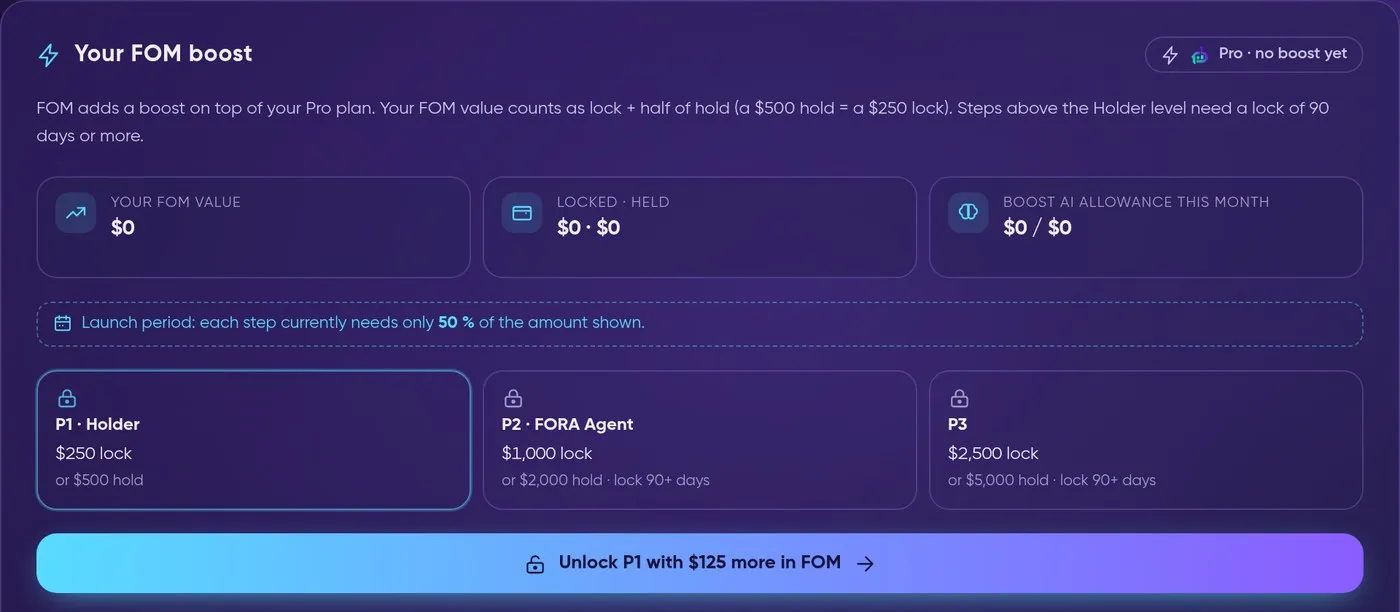
Profile → License → Your FOM boost: your value, the steps of your plan and what the next step needs.