


FORA Video & PDF Tutorials
FORA can turn any page of the app into a short video tutorial or a PDF guide — made for that exact page and delivered right in the FORA chat. FORA opens the real page, clicks through it (views, sub-tabs, filters, sorting), and explains each part while drawing on the screen.
Live recording (demo account): the FORA button next to the ⓘ on Funding Arb → Make a video tutorial → the finished video plays right in the chat.
How to start one
Section titled “How to start one”There are three ways — all of them open the FORA chat on the page you want explained:
- The FORA button next to every ⓘ. Next to every ⓘ info button (on pages, tabs and sub-tabs) there is a small FORA button (a robot head). Click it and a panel of quick actions opens: Explain this page, What is happening now, How do I use it, Make a video tutorial, Make a PDF guide, Video + PDF and My tutorials.
- Quick actions in that panel — one click starts the tutorial.
- Just type it in the FORA chat on that page: “make me a video about this tab”, “PDF only”, “both” — you can add your wishes too: “in English, no music”, “30 seconds, FORA voice” (other languages work too). A typed request always shows the choice card first, so a sentence that only mentions “video” never uses your limit.

Every ⓘ has a small FORA button (robot head) right next to it — also on tabs and sub-tabs.
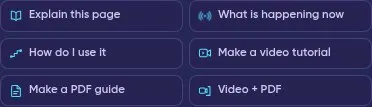
The quick actions FORA opens for that page.
What you get
Section titled “What you get”| Video tutorial | PDF guide | |
|---|---|---|
| What it shows | A guided tour of the live page: FORA clicks the real controls, zooms in on each part and draws a spotlight, numbered callouts and short labels. Short drawn scenes (marked DEMO · illustration) explain the idea behind the page. | The same tour printed: an annotated screenshot of each step with a numbered legend, the drawn diagrams, How to use it steps, a Live data table copied from the page at that moment (with the time) and What it is not. |
| Sound | Captions (word by word from the Free  FOM steps and on paid plans), music and narration — depending on your plan and FOM step. |
— |
| Length | 10 s up to 5 min (your plan + FOM step) |
1 up to 30 pages (your plan + FOM step) |
| Branding | A short Formion intro (about 1 second, not counted in the length) and a small Formion logo in the corner | Formion logo in the header |
The tour always runs on an internal demo account — never on your own account, so your balances, keys and positions never appear in a tutorial. Tutorials explain how a page works; they are not trading advice and never contain trade levels or profit promises.
Delivery, privacy and how long files are kept
Section titled “Delivery, privacy and how long files are kept”- A progress card appears in the chat right away and shows each step (planning the tour, opening the live page, narration, rendering, checking).
- When it is ready, the video plays inside the chat (download or copy a private link), or the PDF card shows its first page with a viewer and a download button.
- Files are private to your account — a link only works while you are signed in.
- Files are kept 7 days on Free and 30 days on Pro and Institutional. My tutorials in the FORA panel lists them.
- A tutorial that fails is not counted — your slot is given back.
- It usually takes about 2–5 minutes (long or 1080p videos take longer).
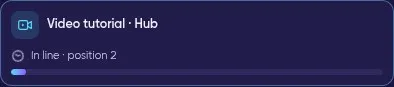
The progress card shows your place in line and then each step.
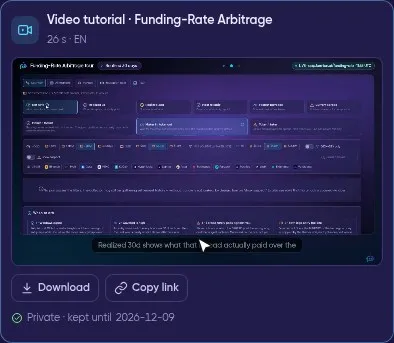
The finished video plays in the chat — download it or copy a private link.
A real 30-second FORA tutorial of the Funding Arb page (made on a demo account; narration plays when you unmute the full video).
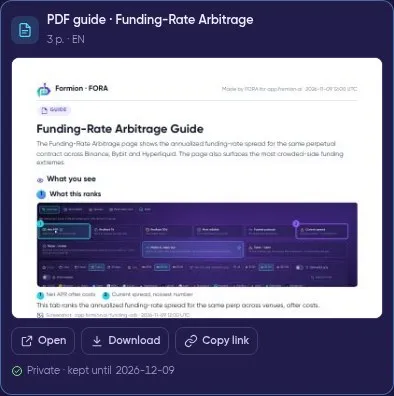
A PDF guide in the chat: first-page preview, Open, Download and Copy link.
Choose how it is made — once
Section titled “Choose how it is made — once”Before a tutorial starts, FORA shows a short choice card, already filled in from your settings:
- Narration language — any of the 11 app languages, or Same as app. Captions follow the narration language; a PDF is written in the chosen language.
- 🎙️ Narration on or off, and the voice (Narrator or FORA, where your plan allows).
- 🎵 Music on or off, and the style (Calm; Pulse and Cinematic where your plan allows).
- Karaoke captions (word by word) or plain captions.
- Length — 15 s · 30 s · 60 s · 90 s · 2 min · 3 min · 5 min, or 1 · 3 · 5 · 10 · 20 · 30 pages for a PDF.
Tap Make it. With Remember my choices switched on (it is on by default) FORA saves them: the next time you ask, the tutorial starts right away and the card shows just one line, for example EN · Narrator · Calm · Karaoke · 60 s — tap Change whenever you want something different.
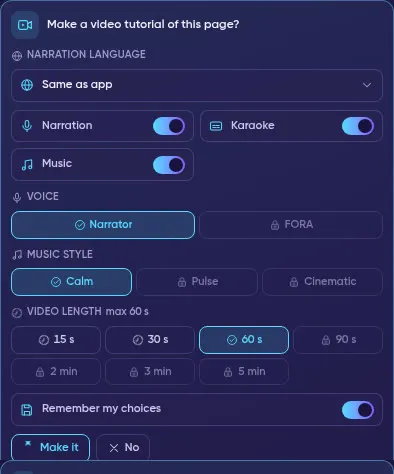
The choice card: language, narration, voice, music, karaoke captions and length — options above your plan show a lock.
Settings, presets and history
Section titled “Settings, presets and history”In the FORA chat open Settings (gear) → Tutorials. Here you change the same choices at any time, and you can save presets — named sets such as Quick EN 30 s or Srpski sa glasom (up to 10). Add, edit or delete them, and tap the to make one your default.
Options above your plan + FOM step show a lock and open with a higher plan or with FOM Lock. A preset you saved on a higher plan keeps working after a downgrade — FORA simply uses the nearest choice your plan allows. Pro and Institutional choose the length (defaults 60 s / 5 pages on Pro, 90 s / 10 pages on Institutional); Free uses its maximum automatically.
My tutorials lists every video and PDF with the page, date, language and length: play or open it, download it, copy a private link, Make again with the same choices, or Delete it (the file is removed). Delete all asks once more before removing everything. Deleting does not give a used tutorial back, and expired files are marked Expired.
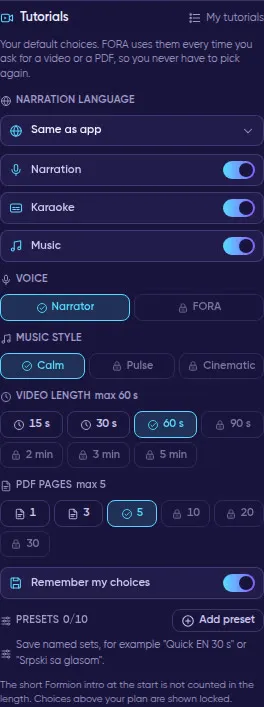
FORA chat Settings → Tutorials: your default choices, presets and locked options above your plan.
Limits by plan and FOM step
Section titled “Limits by plan and FOM step”Counted per UTC day (reset 00:00 UTC). Free without FOM gets one video and one PDF to try, once. The FOM step comes from the FOM you lock (or hold — held FOM counts half) — see FOM Boost.
| Plan · FOM step |
Videos | Max video | PDF guides | Max pages | Video production |
|---|---|---|---|---|---|
| Free | 1 to try | 10 s | 1 to try | 1 | Captions |
| Free F1 · $25 lock | 1 / day | 15 s | 1 / day | 2 | Captions + music |
| Free F2 · $50 lock | 1 / day | 20 s | 2 / day | 3 | Word-by-word captions + music |
| Free F3 · $100 lock | 2 / day | 30 s | 3 / day | 4 | + narration |
| Free F4 · Holder · $250 lock | 2 / day | 45 s | 3 / day | 5 | + narration |
| Pro | 3 / day | 60 s | 5 / day | 5 | Captions, music, narration, real screenshots |
| Pro P1 · Holder · $250 lock | 4 / day | 75 s | 6 / day | 8 | + choose the voice (Narrator / FORA) |
| Pro P2 · FORA Agent · $1,000 lock (90+ days) | 5 / day | 90 s | 8 / day | 10 | Premium voice, real screen recording, choose the music |
| Pro P3 · $2,500 lock (90+ days) | 6 / day | 2 min | 10 / day | 12 | Premium |
| Institutional | 10 / day | 3 min (1080p) | 20 / day | 15 | Premium |
| Institutional I1 · $1,000 lock (90+ days) | 12 / day | 3 min | 25 / day | 20 | Premium |
| Institutional I2 · Agent Pro · $5,000 lock (90+ days) | 15 / day | 4 min | 30 / day | 25 | Premium |
| Institutional I3 · FORA AGI · $25,000 lock (90+ days) | 20 / day | 5 min | 40 / day | 30 | Premium |
Holding FOM instead of locking: hold twice the lock amount (up to the Holder step). Steps above Holder need a lock of at least 90 days. During the launch period (until 13 November 2026) every step needs half the amount shown. Tutorials do not use your monthly boost AI allowance.
How do I see how many I have left?
Section titled “How do I see how many I have left?”Ask FORA: “How many tutorials do I have left?” — FORA reads your own account: your plan and FOM step, how many videos and PDFs you have used today (or your one Free try), your maximum length, the length you chose in Settings, and exactly what the next FOM step or plan would add.
How do I get more?
Section titled “How do I get more?”- Upgrade your plan at formion.ai/pricing — new accounts can start a 7-day Pro trial (no card).
- Lock FOM in Formion Wallet → Earn → FOM Lock (live in beta) — see FOM Hold vs Lock.
Why does my video have no voice?
Narration depends on your plan and FOM step (Free and the first FOM steps get captions and music). On plans with narration, FORA uses our main voice provider and switches to a backup voice automatically if it is down. If no voice is available at that moment, or today’s voice budget is used up, the video is made with captions and music and the chat says “Narration unavailable” — everything else stays the same.
Why is it locked?
Either you used your limit (Free: the one try; paid plans: today’s count — it resets at 00:00 UTC), or you chose a length above your plan + FOM maximum. The lock shows both ways to unlock: a higher plan or FOM Lock.
How long does it take? Usually 2–5 minutes. The progress card shows each step; you can keep using the app meanwhile.
Does it use my account data? No. The tour runs on an internal demo account. Your keys, balances and positions are never shown.
Which languages? All 11 app languages. By default narration, captions and PDFs follow the app language; pick another narration language on the choice card or in Settings → Tutorials.
Can I turn the music or the voice off? Yes — on the choice card or in Settings → Tutorials (narration, music and karaoke captions each have their own switch).