


Coins Hub
The Coins Hub (app.formion.ai → Coins Hub) is where you follow coins day to day: a live coin table with trend scores, your own watchlists, a detail page for every coin, and tools for new launches and presales. The hub is labelled BETA · experimental, no performance claim — it shows data, not trade recommendations.
Live recording: search a coin, open Filters, open Bitcoin, save it to a watchlist, go back and open My watchlist.
Tool status
Section titled “Tool status”| Tool | Status | Who can open it |
|---|---|---|
| Dashboard | Available | Everyone — also without login on hub.formion.ai and coin.formion.ai |
| Presale Watch | Available | Everyone — also without login |
| Sniper | Login needed | Signed-in users (padlock until you sign in) |
| DEX Swaps | Login needed | Signed-in users with a wallet connected in the  Telegram bot |
| 100x Finder | Admin preview | Formion team only (BETA) |
| GMGN | Being rebuilt | The page only shows a “Being rebuilt” notice |
| Token Scanner | Being fixed | Hidden while we fix logic errors |
| Smart Wallets | Being fixed | Hidden while we fix logic errors |
| Graduation Radar | Being fixed | Hidden while we fix logic errors |
| Listing Radar | Being fixed | Hidden while we fix logic errors |
Dashboard
Section titled “Dashboard”The Dashboard has two parts: Trend Watch on the left and the coin table on the right. On a phone or a narrow window the table turns into cards.
Trend Watch
Section titled “Trend Watch”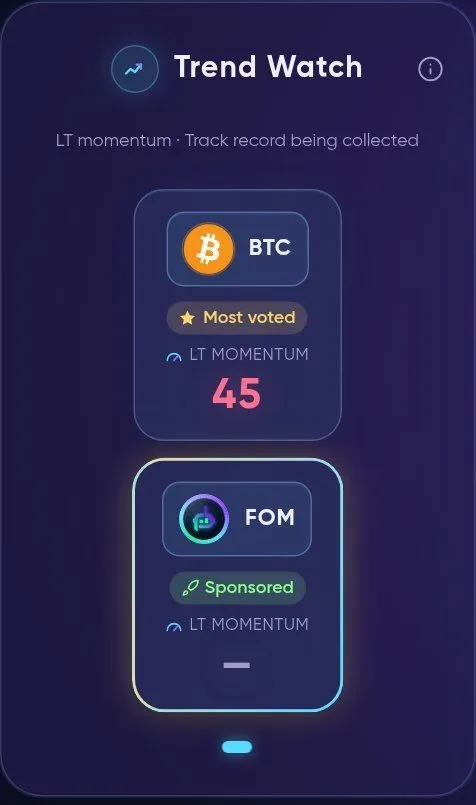
Trend Watch — highlighted coins, each with its LT momentum score.
Trend Watch shows a short, swipeable row of highlighted coins. A coin appears here when it is a Sponsored placement, the Most voted coin of the current week, New listed, or Trending (a measured 24h return of at least +8%). Every card shows the same LT momentum score as the table; a dash means the score is not available. Tap ⓘ next to the title for the full explanation.
- Most voted — the community’s top pick this week (votes reset weekly).
- Sponsored — a paid placement by the project team. It is always labelled and is not a recommendation.
Coin table
Section titled “Coin table”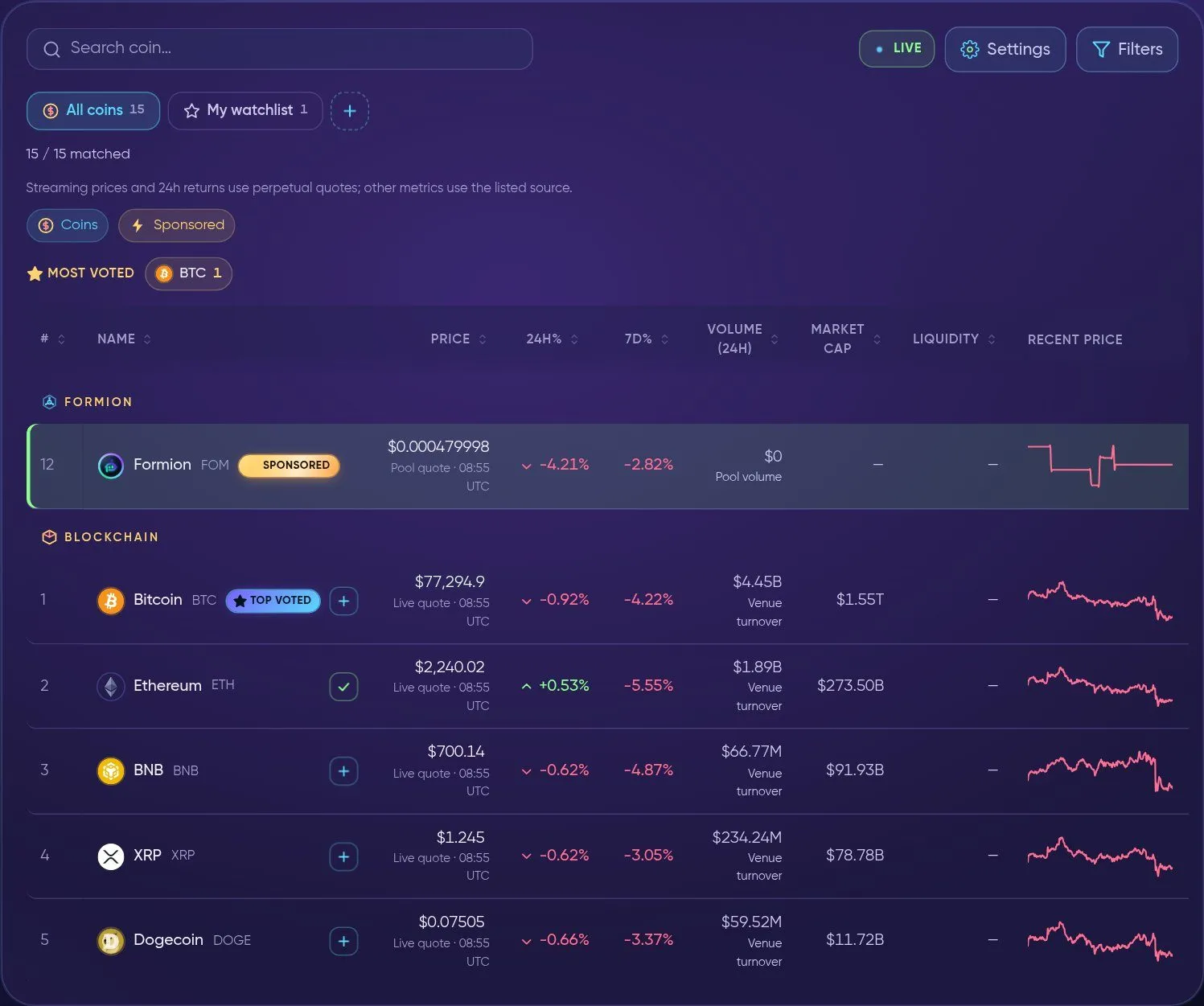
The coin table — search, live prices, watchlist tabs and coins grouped by category.
At the top of the table:
- Search coin… — type a name or ticker; the table narrows as you type (Clear all resets it).
- LIVE — prices are streaming in real time. You can switch to a lighter refresh in Settings.
- Settings and 🔽 Filters — see below.
- All coins / My watchlist / + — switch between the full list and your watchlists; + creates a new watchlist.
- MOST VOTED — the coins with the most votes this week, with their vote count.
Coins are grouped by category (for example Formion, Blockchain, Perp DEX, DeFi, Memecoin). Each row has a + button to add the coin to a watchlist (a ✓ shows it is already in one). Badges next to a name: SPONSORED (paid placement, labelled) and TOP VOTED (most votes this week).
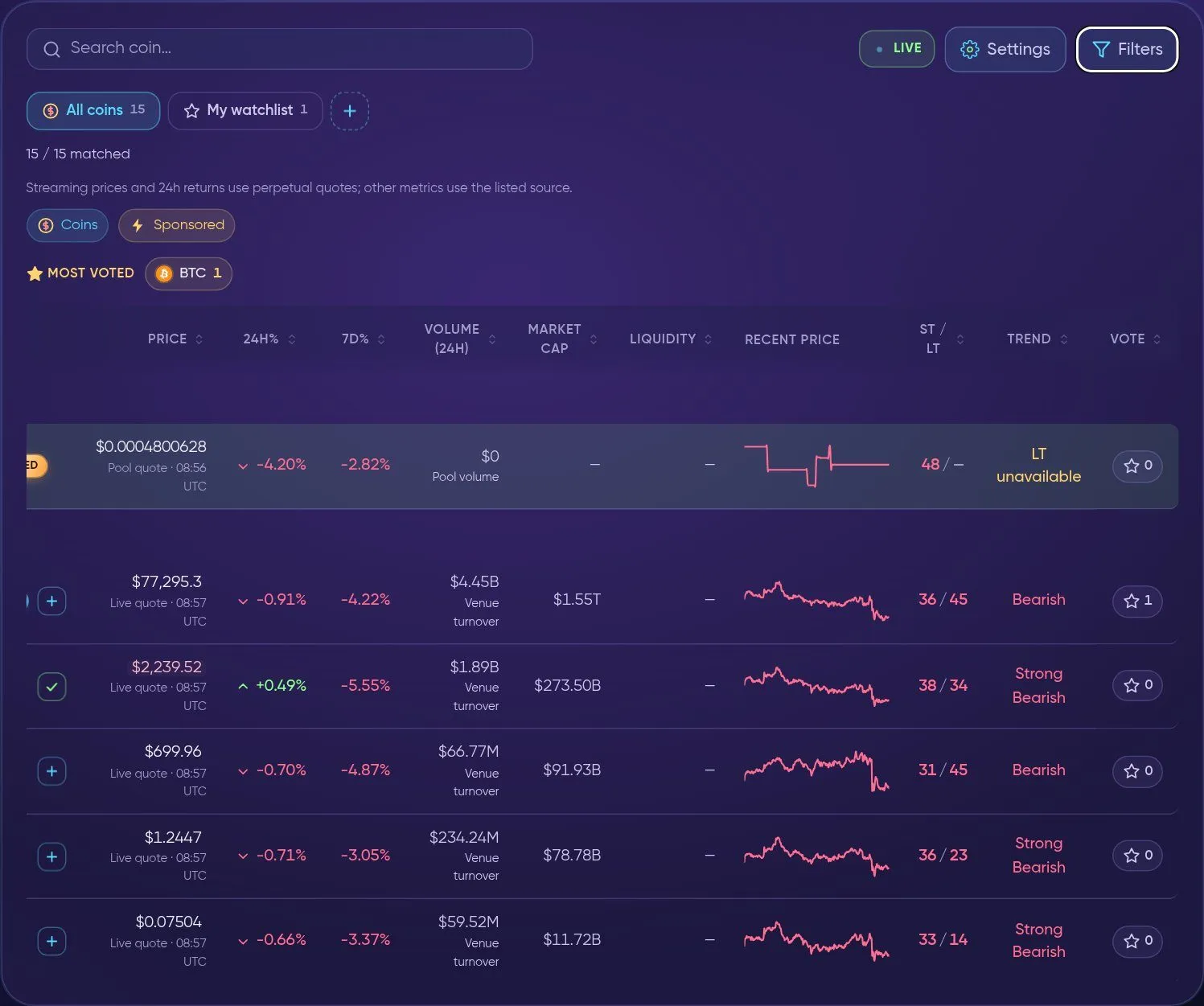
Scroll the table sideways for the trend columns and the weekly vote.
| Column | What it shows |
|---|---|
| # | Position in the list |
| Name | Coin name, ticker and badges |
| Price | Latest price. The line under it tells you where it comes from and when: Live quote (streaming perpetual quote), Pool quote (on-chain DEX pool) or Hourly close |
| 24h% / 7d% | Price change over 24 hours and 7 days |
| Volume (24h) | Trading volume — Venue turnover for exchange-listed coins, Pool volume for DEX tokens |
| Market cap | Market capitalisation, when known |
| Liquidity | Measured DEX pool depth (a dash for coins that are not pool-priced) |
| Recent price | A small price sparkline |
| ST / LT | Two momentum scores from 0 to 100: ST = short term (hourly bars, about 7–12 days), LT = long term (daily bars, about 1 year, anchored to the 200-day line) |
| Trend | The LT regime in words: 70+ Strong Bullish · 60–70 Bullish · 50–60 Neutral · 40–50 Bearish · under 40 Strong Bearish. LT unavailable when there is not enough history |
| Vote | Vote for the coin this week; the number is its current vote count |
Click any column header to sort. A coin can be short-term bullish in a relief rally while still long-term bearish below its 200-day line — that is why both scores are shown.
Settings
Section titled “Settings”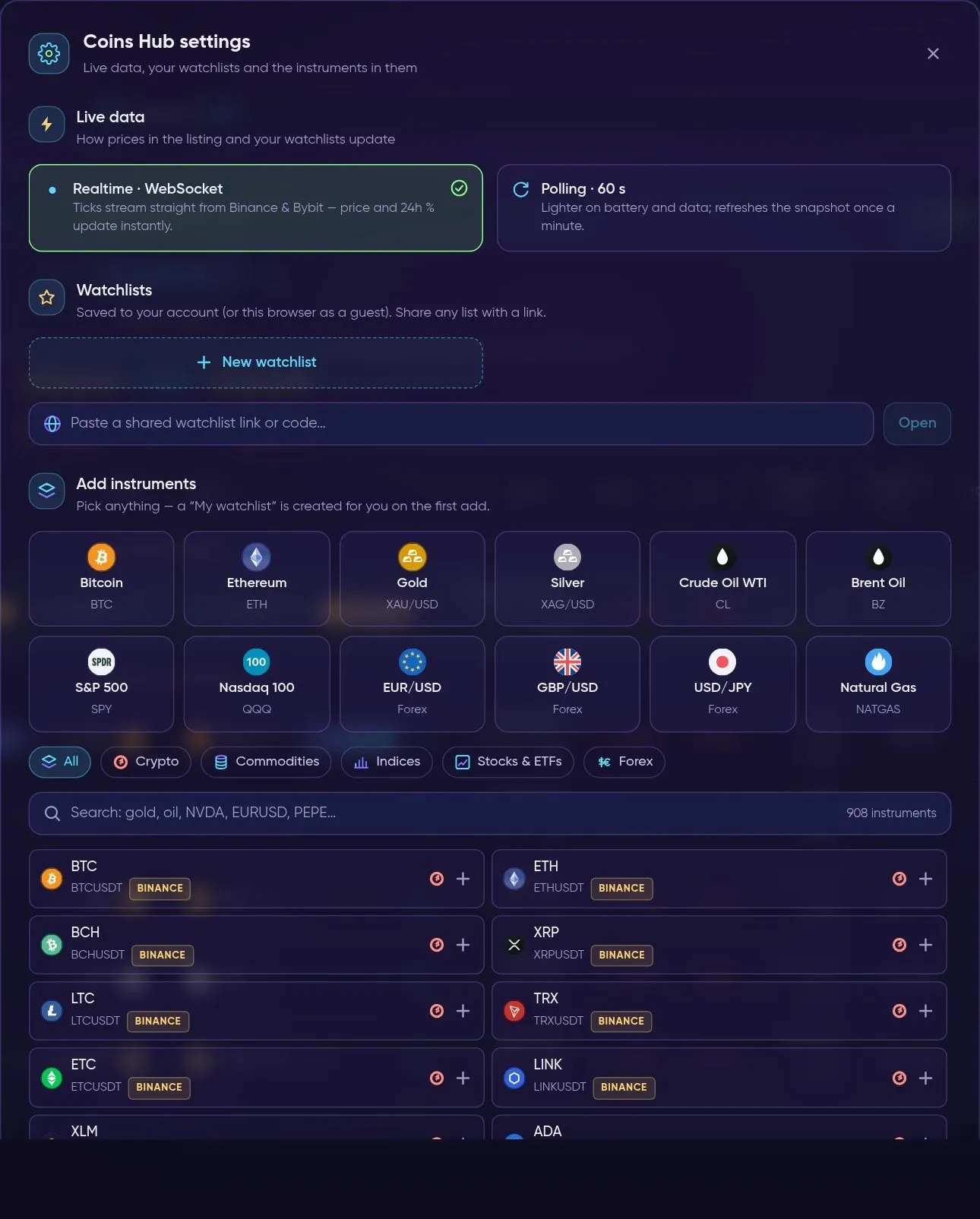
Settings — live data mode, your watchlists and 900+ instruments to add.
- Live data — Realtime · WebSocket (ticks stream straight from
 Binance and
 Bybit, price and 24h % update instantly) or Polling · 60 s (lighter on battery and data; refreshes once a minute).
- Watchlists — create a New watchlist, or paste a shared watchlist link or code and press Open. Watchlists are saved to your account (or to this browser when you are a guest), and any list can be shared with a link.
- 🗂️ Add instruments — pick from quick picks (
 Bitcoin,
 Ethereum,
 Gold,
 Silver, Crude
 Oil WTI, Brent Oil,
 S&P 500,
 Nasdaq 100, EUR/USD, GBP/USD, USD/JPY, Natural Gas) or search all instruments by group: Crypto, Commodities, Indices, Stocks & ETFs, Forex. A “My watchlist” is created for you on the first add.
Filters
Section titled “Filters”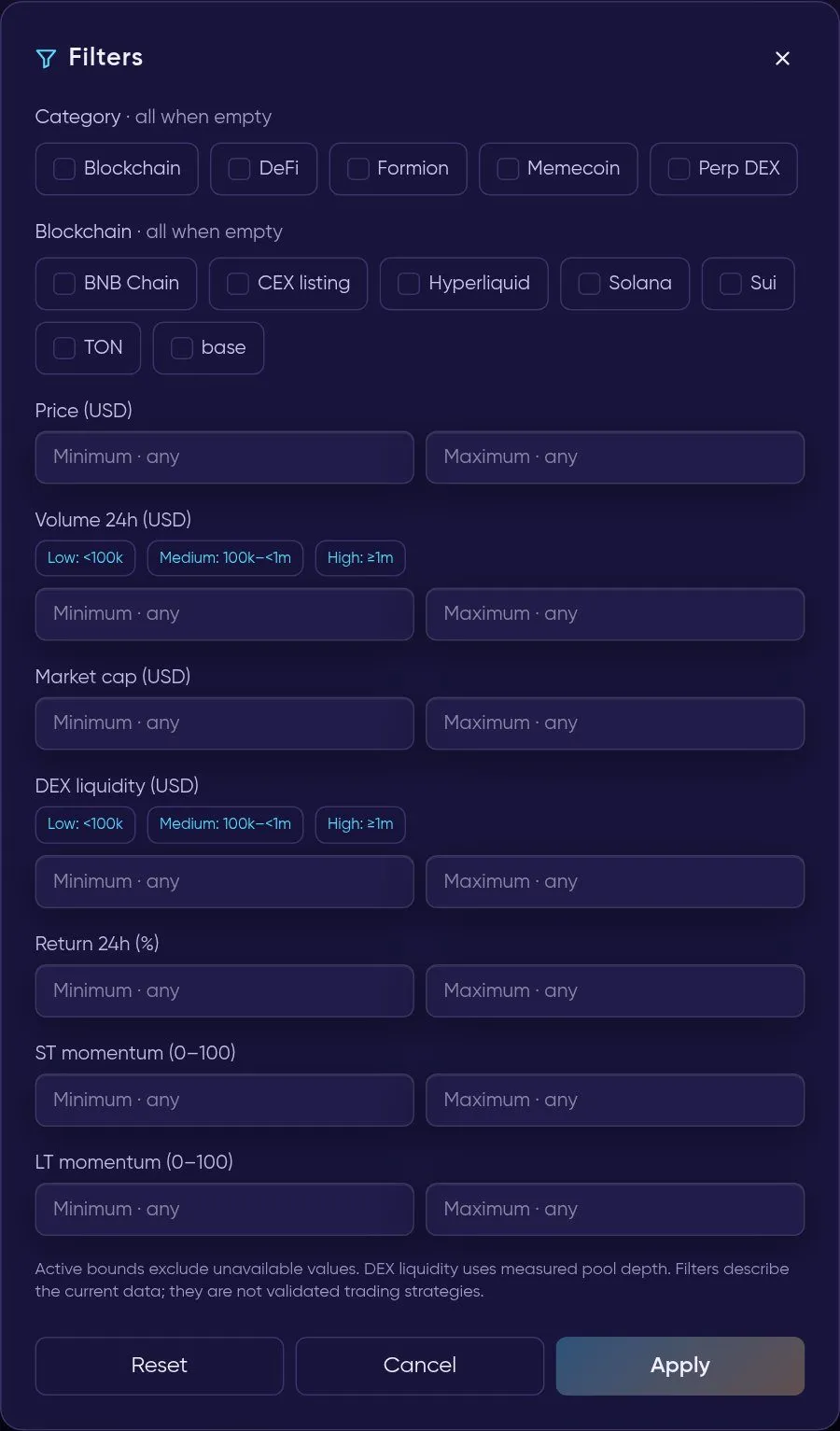
Filters — narrow the table by category, chain, size and momentum.
- Category and Blockchain — tick one or more; nothing ticked means all.
- Price, Volume 24h, Market cap, DEX liquidity, Return 24h, ST momentum and LT momentum — set a minimum and/or maximum. Volume and liquidity have quick buttons: Low (under 100k), Medium (100k–1m), High (1m and more).
- Apply filters the table, Reset clears everything, Cancel closes without changes.
Active bounds exclude coins whose value is unavailable. Filters describe the current data — they are not validated trading strategies.
My watchlist
Section titled “My watchlist”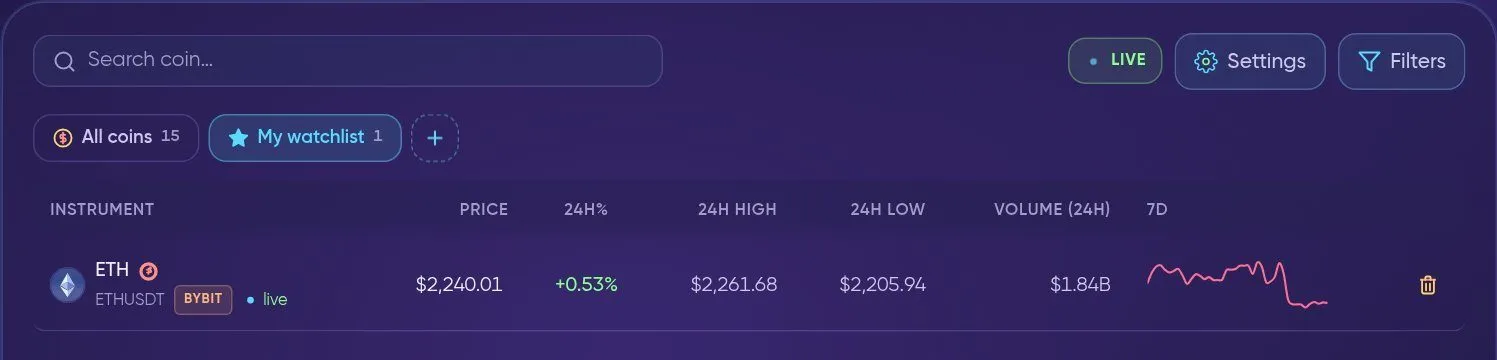
My watchlist — your own instruments with live price, 24h range and volume.
Add a coin with + in the table, with Watchlist on a coin’s detail page, or from Settings → Add instruments. The My watchlist tab then shows each instrument with its venue (e.g. BYBIT, BINANCE) and a live dot, Price, 24h%, 24h High, 24h Low, Volume (24h) and a 7D sparkline. The 🗑️ icon removes an instrument.
Coin detail view
Section titled “Coin detail view”Click a coin’s name to open its detail view; Back to coins returns to the table.
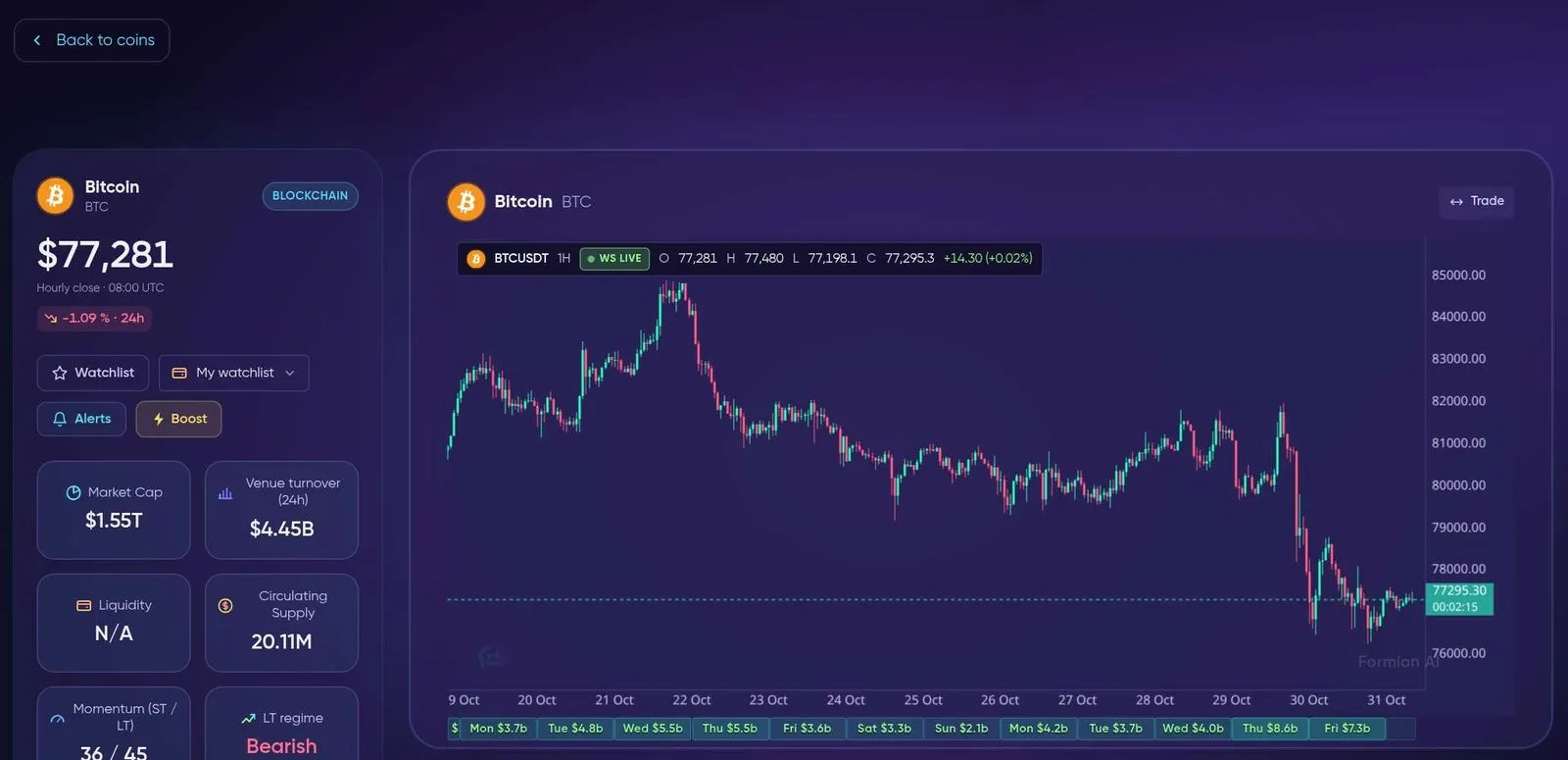
Coin detail — price, key metrics, watchlist and alert buttons, and a live chart.
- Price card — latest price with its time and 24h change, the category badge, Watchlist (shows Saved once added; the menu next to it picks which watchlist) and Alerts.
- Key metrics — Market Cap, Venue turnover (24h), Liquidity, Circulating Supply, Momentum (ST / LT) and LT regime.
- Converter — convert the coin to USD and other currencies.
- Live chart — hourly candles with daily volume underneath; Trade shows a fast buy/sell strip on the chart (paper by default; real venues show the plan and ask before sending).
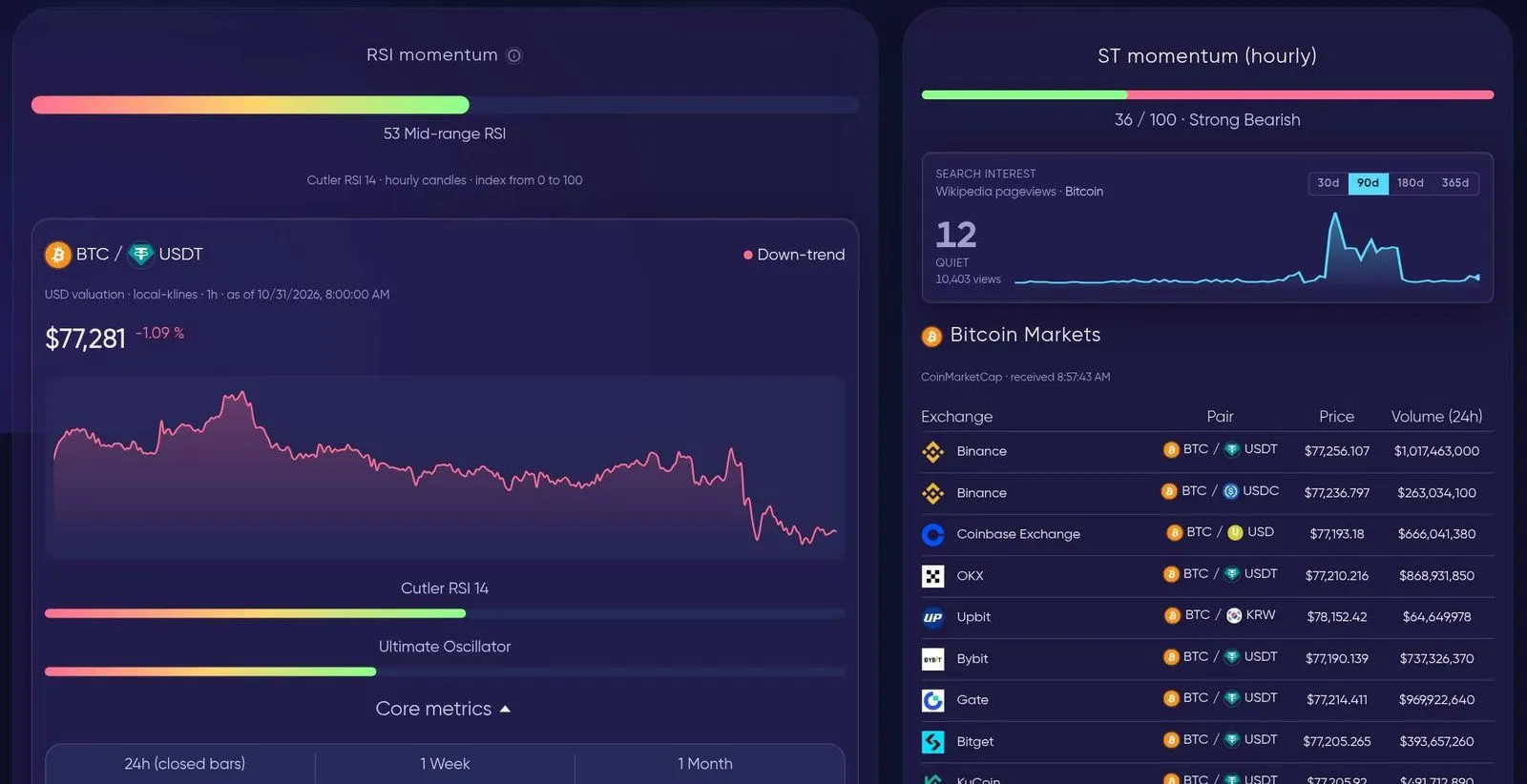
Further down — momentum gauges, search interest and where the coin trades.
- RSI momentum and Core metrics — RSI, Ultimate Oscillator, 24h / 1 week / 1 month change, EMA 13, MACD and more indicators.
- ST momentum (hourly) — the short-term score as a gauge.
- Search interest — Wikipedia pageviews for the coin over 30, 90, 180 or 365 days.
- Markets — exchanges and pairs where the coin trades, with price and 24h volume.
Presale Watch
Section titled “Presale Watch”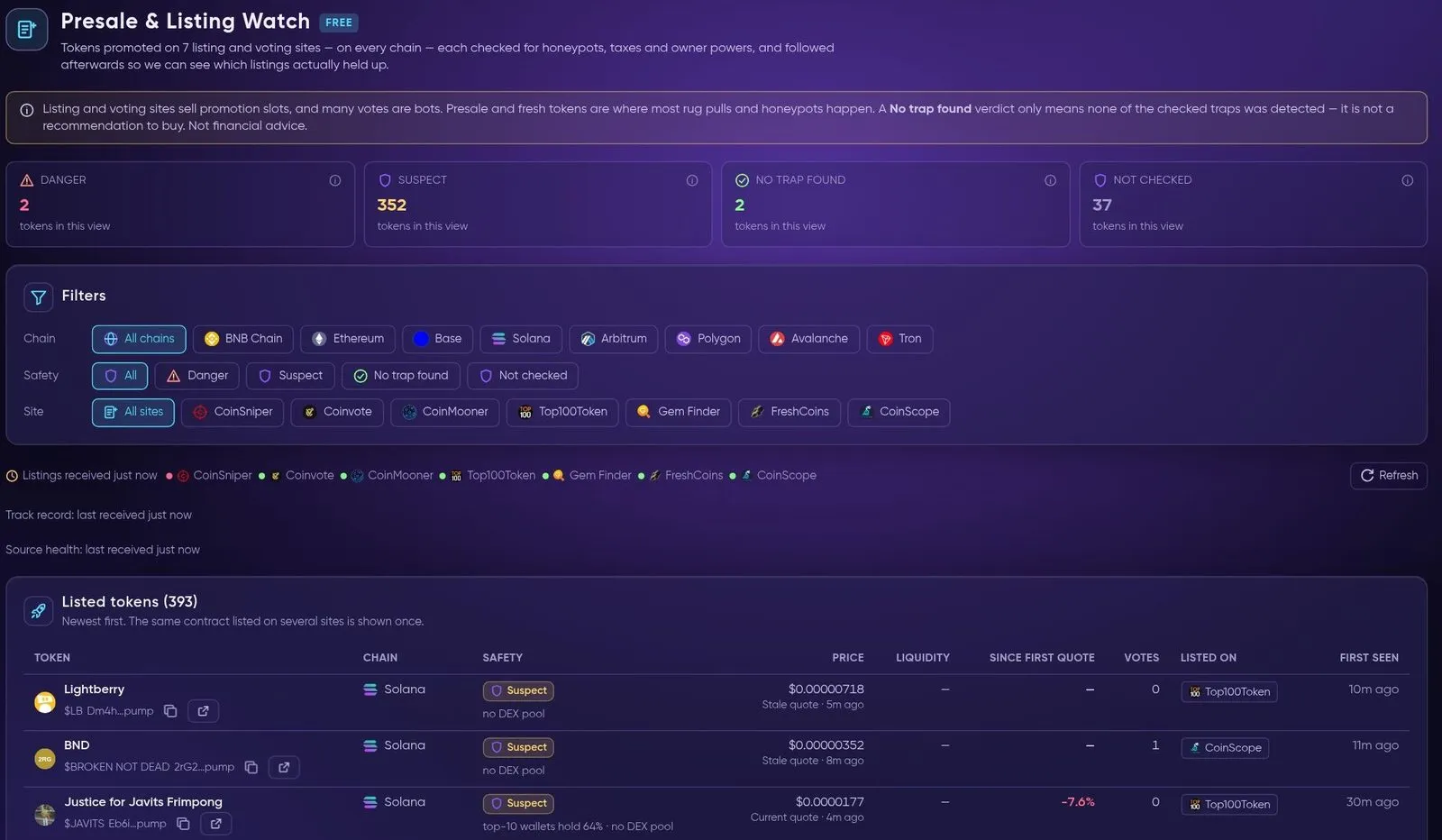
Presale & Listing Watch — promoted tokens, each checked for common traps.
Presale & Listing Watch (free) collects tokens promoted on listing and voting sites across chains. Each token is checked for honeypots, taxes and owner powers and gets a safety label — Danger, Suspect, No trap found or Not checked — and is followed afterwards to see which listings held up. Filter by Chain, Safety and Site.
Sniper and DEX Swaps (login needed)
Section titled “Sniper and DEX Swaps (login needed)”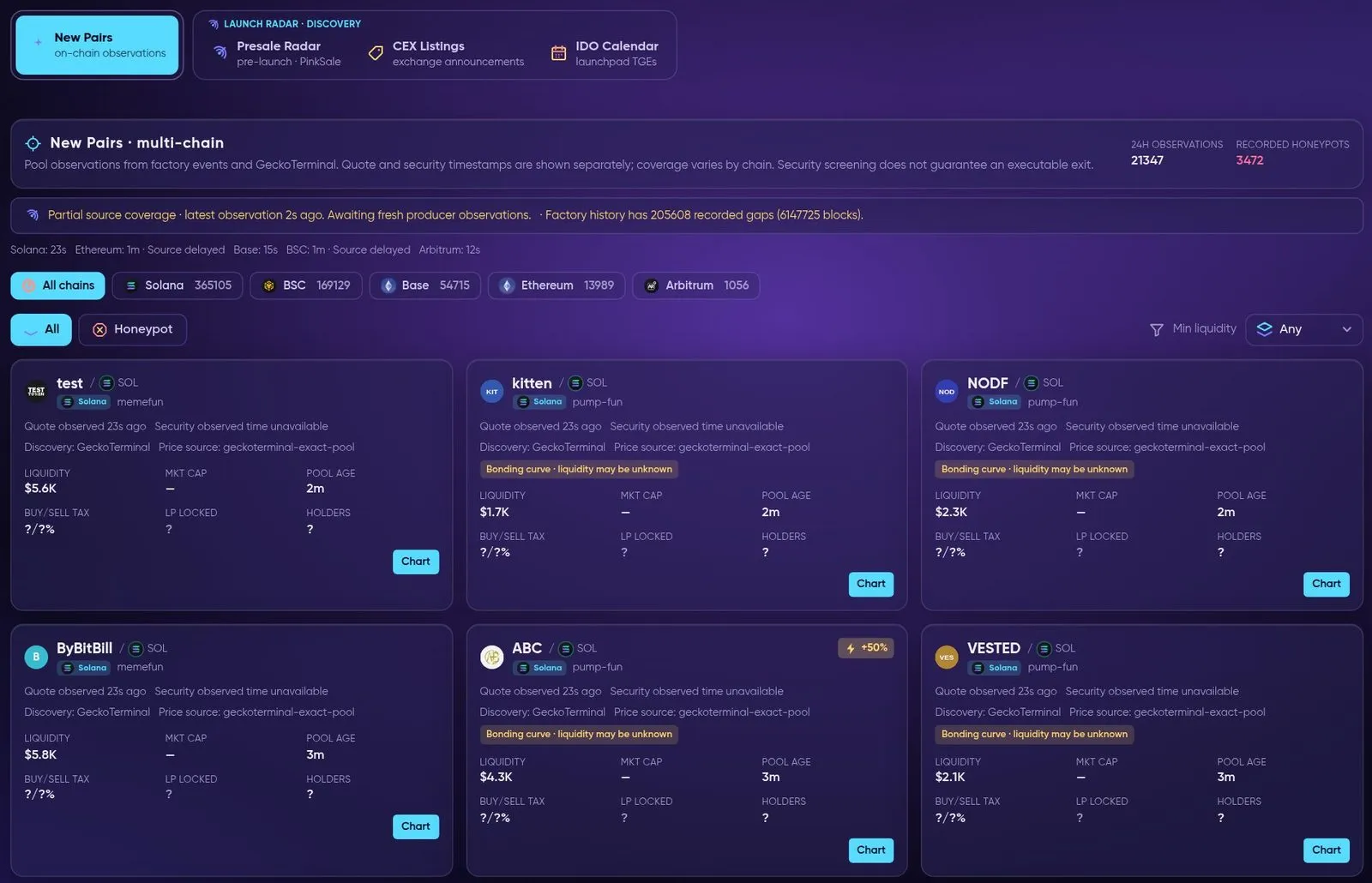
Sniper → New Pairs — fresh pools across chains with liquidity, pool age, tax and lock fields (sign-in needed).
- Sniper — launch tracking: New Pairs (on-chain pool observations), Presale Radar (PinkSale), CEX Listings (exchange listing announcements) and an IDO Calendar (launchpad TGEs).
- DEX Swaps — server-signed on-chain swaps from the wallet you connect in the Telegram bot (
/wallet), routed via Jupiter (
 Solana), 7K (Sui) and
 LI.FI / deBridge (EVM and cross-chain), with a list of your recent swaps.
Continue your research
Section titled “Continue your research”Combine the Coins Hub with Pulse narrative context, News event timestamps and FORA text or voice research. Coin research coverage does not establish execution support on a connected venue.