


Strategy Lab & Marketplace
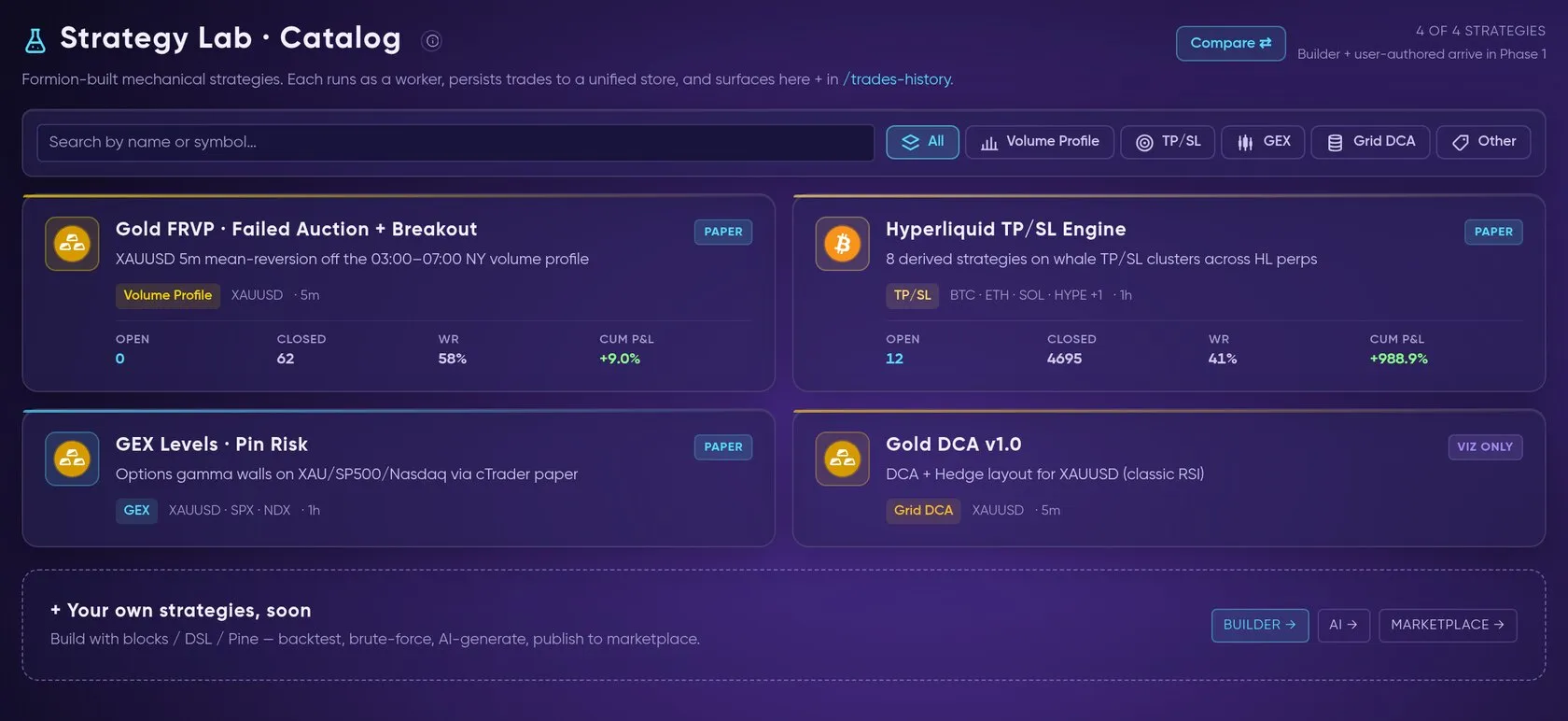
Build a strategy with no code, test it honestly, then publish it to the marketplace.
The Strategy Lab (app.formion.ai → Backtest → Strategy Lab) is where you turn an idea into a tested strategy — without writing code — and optionally publish it to the marketplace. Strategy Lab is on every plan: Neural gets the Builder and 3 backtests per day, Pro 50 per day, Institutional unlimited (per UTC day, reset 00:00 UTC). See Pricing & Tiers.
From idea to marketplace in 16 seconds: build with no code → backtest → publish gate → subscribe on a demo or live account (demo values).
Live recording: the no-code Builder — RSI below 30 on ETH 1h, TP 2 % / SL 1 %, Run backtest, then KPIs, equity curve and the trade list.
Three ways to build
Section titled “Three ways to build”- No-code Builder — compose entry rules from indicator blocks (price, RSI, EMA, SMA, MACD, ATR, Bollinger Bands, volume), pick exits (TP/SL %, ATR multiples, time stop, opposite signal), fill the risk block and fees, and backtest on the server. Drafts are saved to your account. No Pine, no scripting.
- AI Agent — describe what you want in plain language (e.g. “an RSI strategy on
 BTC 4h”) and the agent maps it to a built-in template, backtests it on live candles, charts the BUY/SELL markers with win rate and gives you the equivalent Pine Script. You can send the result to a paper agent or export it to
 TradingView.
- Strategy Finder — enter just a symbol (crypto from
 Binance/Bybit, or forex, metals and indices from
 cTrader). It scans regimes, Wyckoff phases and sessions, then brute-forces a strategy grid (RSI, Z-RSI, EMA cross, Bollinger touch, breakout entries × stop and R:R variants) with a locked holdout and a walk-forward check — net of fees and funding, compared with HODL.
Test before you trust
Section titled “Test before you trust”Backtests report win rate, profit factor, expectancy, max drawdown and an equity curve, with your fee setting applied. Compare puts catalog strategies side by side. The separate Strategy Lab Backtest report and Brute force sweep tabs are marked Soon. Keep the optimisation window separate from validation and forward-test the selected candidate.
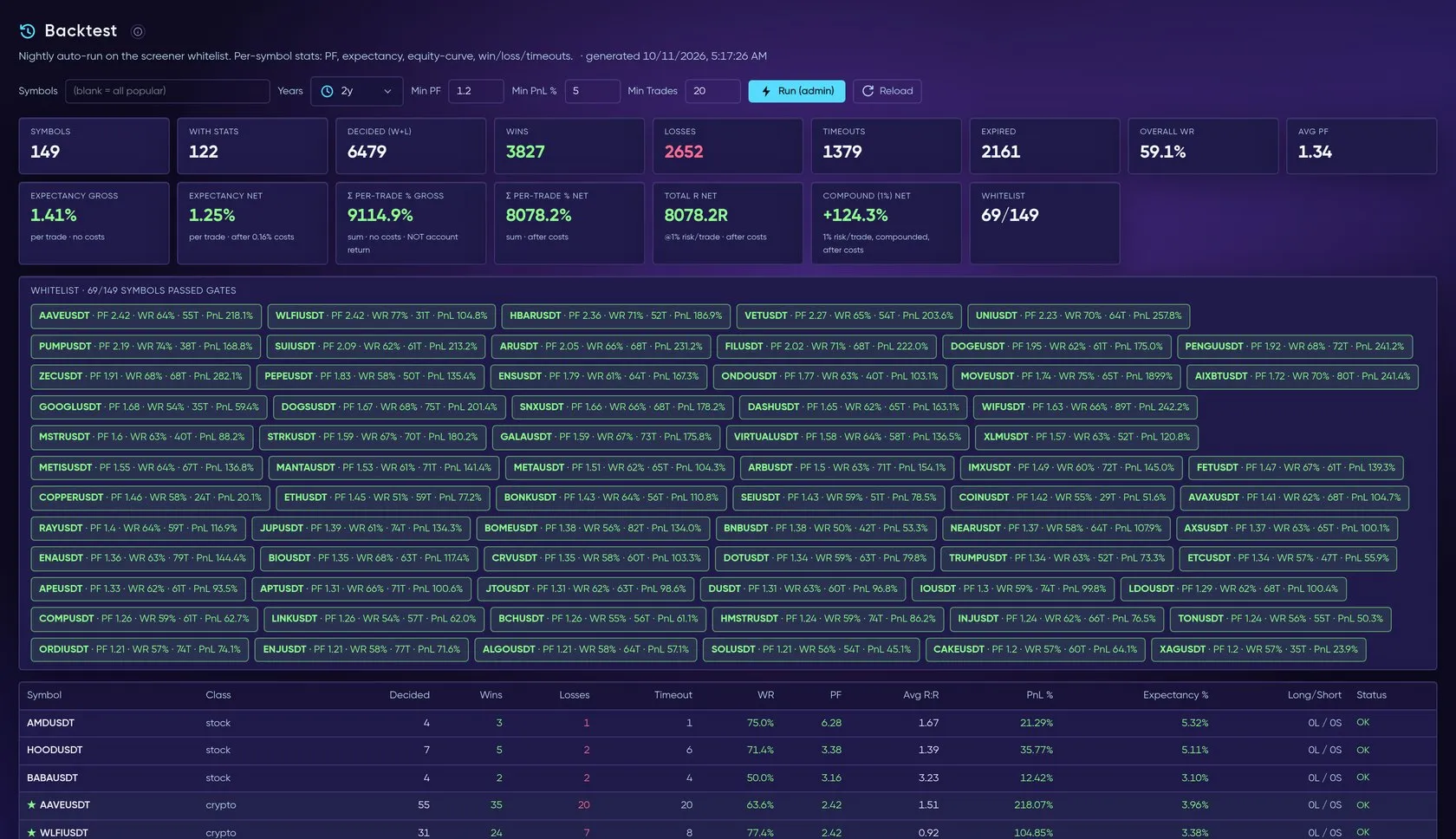
The Backtester — trades, win rate, expectancy and profit factor per symbol, with a whitelist of symbols that passed.
Publish, subscribe & run
Section titled “Publish, subscribe & run”A strategy reaches the marketplace only after passing the publish gate.
Builder strategies pass a publish gate before they reach the marketplace: a fresh 365-day backtest plus an in-sample / out-of-sample check (at least 30 trades, drawdown ≤ 30%, positive expectancy, profit factor ≥ 1.1, positive out-of-sample expectancy). Once published, the signal worker runs the strategy on fresh candles and its forward record is tracked in Trades History.
In the 🛒 Marketplace you browse Formion catalog strategies, bots and community strategies with live KPIs and subscribe by attaching one to a connected demo or live exchange account. Subscriptions are managed in the Subscriptions tab; live attachments are capped by your plan’s live-bot limit (see Bots & Automation).
- Listings can be free or paid. Paid listings need an approved Partner application (KYC) on the Author page.
- Subscribers pay Formion; authors receive their share after a 25% platform fee and a 14-day hold. The Author page shows your subscribers, balance and payout history.
- Payouts —
 USDC or
 FOM, both on
 Base. Request a payout in Creator Studio and choose USDC or FOM (minimum $20 in USD value; one payout covers strategies, bots, indicators and signals).
 USDT and other networks are not offered.
- FOM payouts use the higher of the 7-day and 30-day average price (TWAP) of the FOM/WETH pool on Base, so a short dip in the pool price has little effect on your payout. Before you confirm, you see the FOM amount and the price used; the price is fixed when we approve your payout, and you never get less than the USD amount at that price. There is no bonus for choosing FOM, and FOM’s value can go up or down after you receive it.
- An admin sends every payout and the transaction is verified on-chain; you get a
 Telegram message with the link.
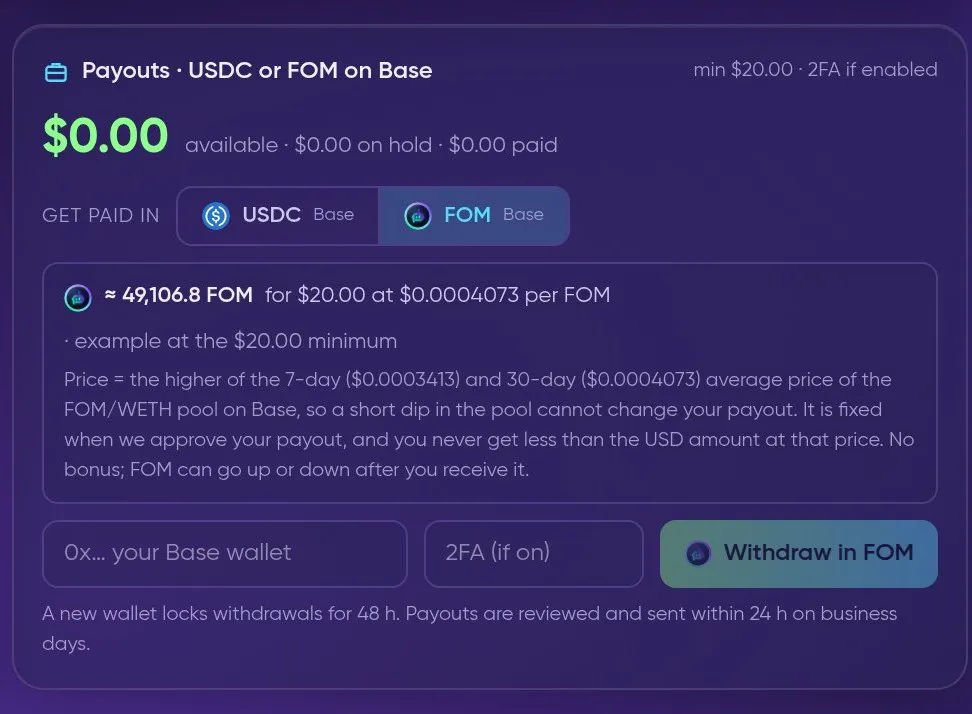
Creator Studio → Payouts: choose USDC or FOM. With FOM you see the FOM amount and the price used (higher of the 7-day and 30-day pool average) before you confirm.
- Check each listing’s subscription and checkout terms before subscribing.